Inventory value statement with standard cost breakdowns
A report that shows the inventory value statement for a date interval, grouped and sorted as you choose, with column headings by cost group type and optional detail.
Inventory value statement with standard cost breakdowns
Inventory managementInquiries and reportsInventory value reports
output:InventCostValue
Business process
Maintain inventory levels
Menu item
output:InventCostValue
Show what matters for
PAGE GUIDEWhat the page does and how to use it7 sections. Choose a role to highlight what matters to you.
Everyone
1What it is and why
What it is
A report that shows the inventory value statement for a date interval, grouped and sorted as you choose, with column headings by cost group type and optional detail.
What you do here
Use this report to review inventory value by item or another grouping, with a breakdown by cost group type.
The page in Dynamics 365. page title tab to open what to set or check
Inventory management › Inquiries and reports › Inventory value reports › Inventory value statement with standard cost breakdowns
End user · Functional consultant
3How to do it
About the examples: Examples and screenshots in this guide use BEAT, a demo company in a Dynamics 365 test environment. Use your own company's codes and values instead of copying them.
When to run it
When to run it
When you review inventory value by cost group, for example at period end or after a standard cost update.
How often
On demand, usually at period end.
What the output shows
An inventory value statement for the period, grouped as chosen, with one column per cost group type and the beginning balance when included. Totals that look wrong usually come from the date interval, or from leaving Include beginning off.
Go to Inventory management > Inquiries and reports > Inventory value reports > Inventory value statement with standard cost breakdowns.
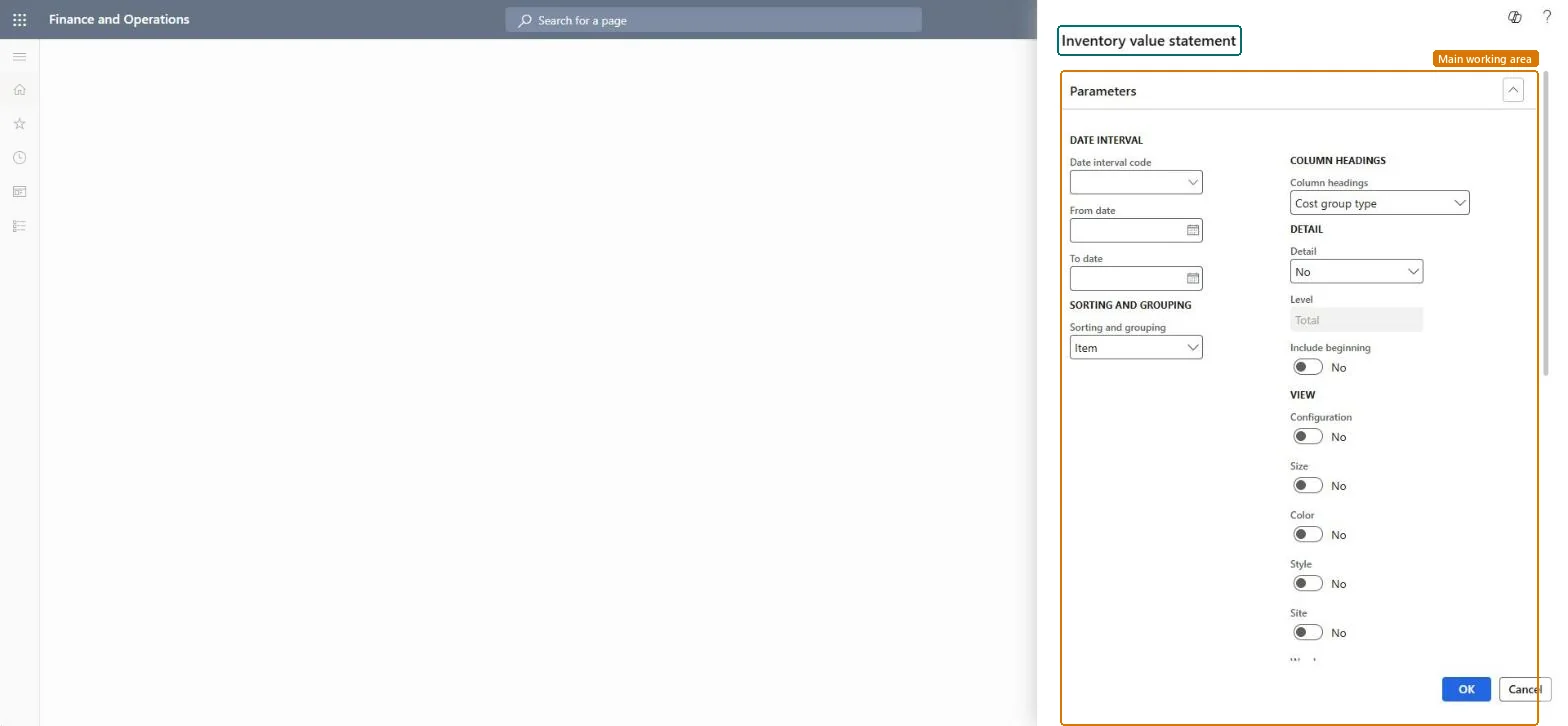
Select a Date interval code, or enter the From date and To date.
Under Sorting and grouping, choose how to order the statement; Item is the default.
In Column headings, keep Cost group type to split values by cost group type, set Detail, and switch Include beginning to Yes to include the beginning balance.
Under View, switch on the dimensions to show, then run the report and review each line's value split by cost group type.
Nothing to undo: The statement only reads inventory transactions; it changes nothing. Microsoft Learn
Technical architect
5Technical
Menu item
output:InventCostValueChecked in Dynamics 365
Form
SysOperationTemplateFormChecked in Dynamics 365
Roles to set it up and use it
To use itAccounting manager LedgerAccountingManagerInventory accountant clerk InventCostCostClerkInventory accountant InventCostAccountantGive people one of these roles. On this system, 3 roles can run this page.Checked in Dynamics 365