BeyondERP.Newsletter
Menu

Report page · Human resources

OSHA 301 prep report

A report that gathers the data needed to prepare an OSHA 301 incident report for each recorded injury or illness.

Business process
Audit workplace for safety
Menu item
HcmOSHA301PrepReport
Setup steps
1 on this page
Show what matters for
PAGE GUIDEWhat the page does and how to use it8 sections. Choose a role to highlight what matters to you.
Everyone

1What it is and why

What it isA report that gathers the data needed to prepare an OSHA 301 incident report for each recorded injury or illness.
What you do hereUse this page to produce the case details you need to complete OSHA 301 incident reports, filtered by date range and case number.
ExampleFor example, after Ana Bowman's wrist fracture is recorded as case 0007, BEAT runs the report for case 0007 and copies the details into the OSHA 301 incident report.
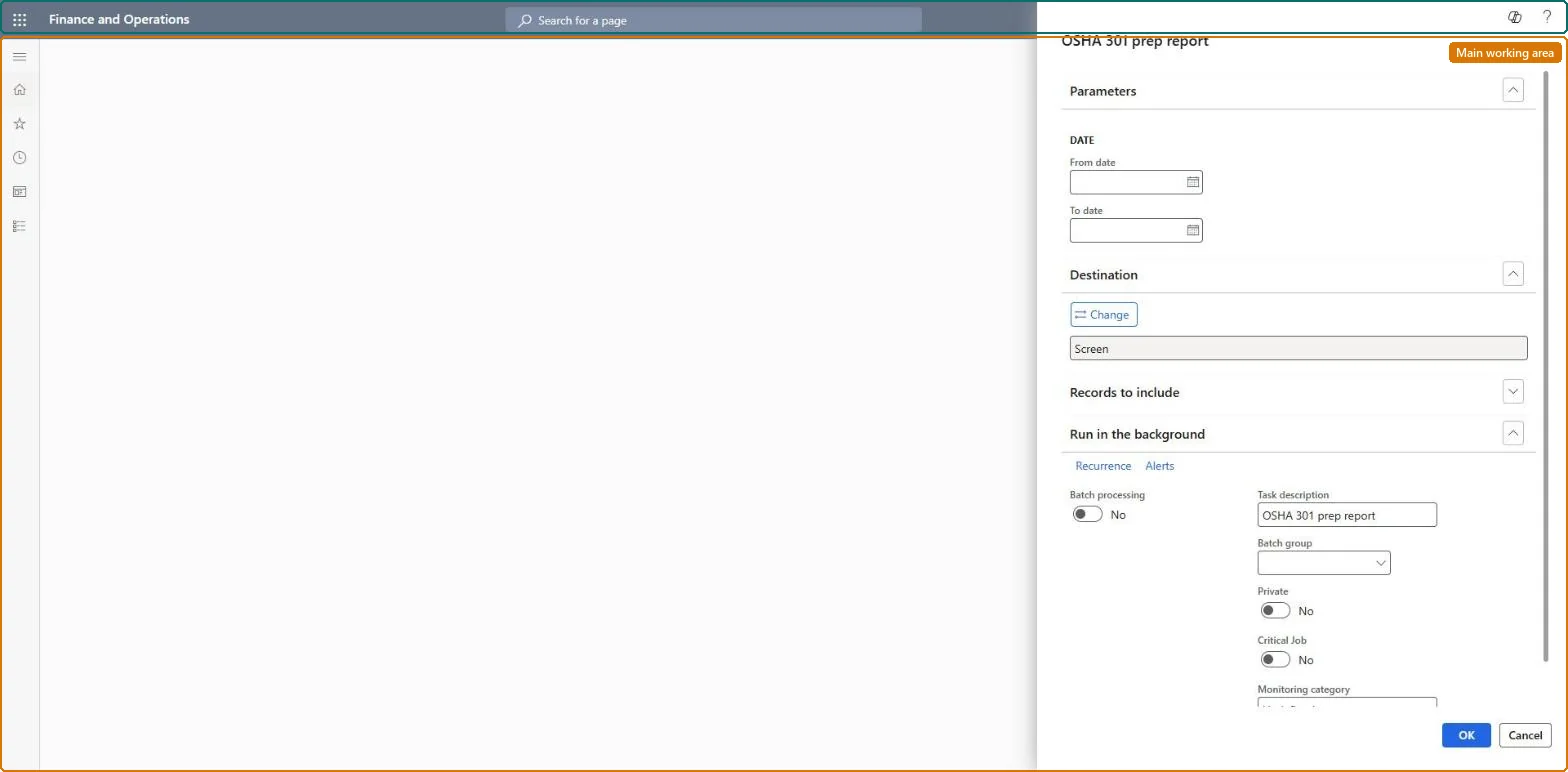
OSHA 301 prep report page in Dynamics 365
The page in Dynamics 365. page title tab to open what to set or check
Functional consultant · Solution architect

2Where it fits

Business processManage workplace compliance › Audit workplace for safety
Menu pathHuman resources › Workers › Injury and illness › OSHA 301 prep report
Set up firstInjury or illness incidents Microsoft Learn
Used next byOSHA 300 log prep report Microsoft Learn
Related pagesOSHA 300A prep report Microsoft Learn
End user · Functional consultant

3How to do it

About the examples: Examples and screenshots in this guide use BEAT, a demo company in a Dynamics 365 test environment. Use your own company's codes and values instead of copying them.

When to run it

When to run itWhen a recordable injury or illness occurs and you need to complete the OSHA 301 incident report for that case.
How oftenOn demand, once for each new recordable case.
What the output showsThe details of each selected case that the OSHA 301 form asks for. A case that doesn't appear usually falls outside the dates or case number range you entered.

Source: Microsoft Learn

Setup steps on this page

Prepare an OSHA 301 report for each recorded case

Prepare the OSHA record from complete incident cases (US only).

Steps from Microsoft

  1. Go to Human resources > Workers > Injury and illness > OSHA 301 prep report.
  2. Under Parameters, set the From date and To date to find the cases that happened in that period.
  3. Use Case number to pick one case or a range. When you also enter dates, only cases that match both are found.
  4. In Records to include, filter further on the worker if you need one person's incident report.
  5. Read the details of each case and copy them into the OSHA 301 incident report for that case.

Source: Microsoft Learn

Fields on the page

FieldWhat it means
From dateThe first date of the reporting period.Microsoft Learn
To dateThe last date of the reporting period.Microsoft Learn
Case numberThe case number, or range of case numbers, to include; when combined with dates, only cases matching both are found.Microsoft Learn

Common errors and fixes

MessageWhat to do
A case number exists but the report finds nothingThe case is outside the dates entered; with both dates and case numbers only matching cases are found. Clear the dates or widen them. Microsoft Learn
Functional consultant

4Setup decisions

Setup stepRecommended value and whyDecision, common mistake and test
Prepare an OSHA 301 report for each recorded caseRun it for each new recordable case, by case number.An OSHA 301 report is needed for each injury or illness recorded in the OSHA 300 log; the report collects the case, treatment, worker and address details.When is the 301 prepared?Entering a date range that excludes the case together with its case number, so the case isn't found.Test: Prepare an OSHA 301 report for each recorded case

Feature management and licence

Licence or add-inHR and safety staff of US legal entities prepare OSHA records from these reports. No Feature management feature is needed for this page.

Microsoft Learn

Solution architect

5Design impact

Shared or per companyPer company data, US only: the OSHA reports read injury or illness incidents, which Data management lists as not shared, and are run per regulatory establishment, the workplace location (Data management lists Regulatory establishments as shared). Checked in Dynamics 365
Can it be undoneNothing to undo: The report only reads case details; it changes nothing. Microsoft Learn
If you change it laterThe report reads the incident, its treatments, the worker's personal details and address, so missing treatments or addresses show as blanks until they are entered and the report is run again. Microsoft Learn
Technical architect

6Technical

Menu itemHcmOSHA301PrepReport Checked in Dynamics 365
FormSysOperationTemplateForm Checked in Dynamics 365
Roles to set it up and use itTo use itHuman resource manager HcmHumanResourceManagerHuman resource assistant HcmHumanResourceAssistantCompensation and benefits manager HcmCompensationAndBenefitsManagerGive people one of these roles. On this system, 3 roles can run this page.Checked in Dynamics 365
Developer

7Developer

Open it by URLhttps://<your-environment>/?mi=HcmOSHA301PrepReport
Data migrationLoad order: The OSHA 301 prep report has no data entity in Data management, so it can't be loaded from a file or a configuration template. It reads the incidents, workers and regulatory establishments; load those and run the report in each environment.Microsoft Learn
Everyone

8Sources