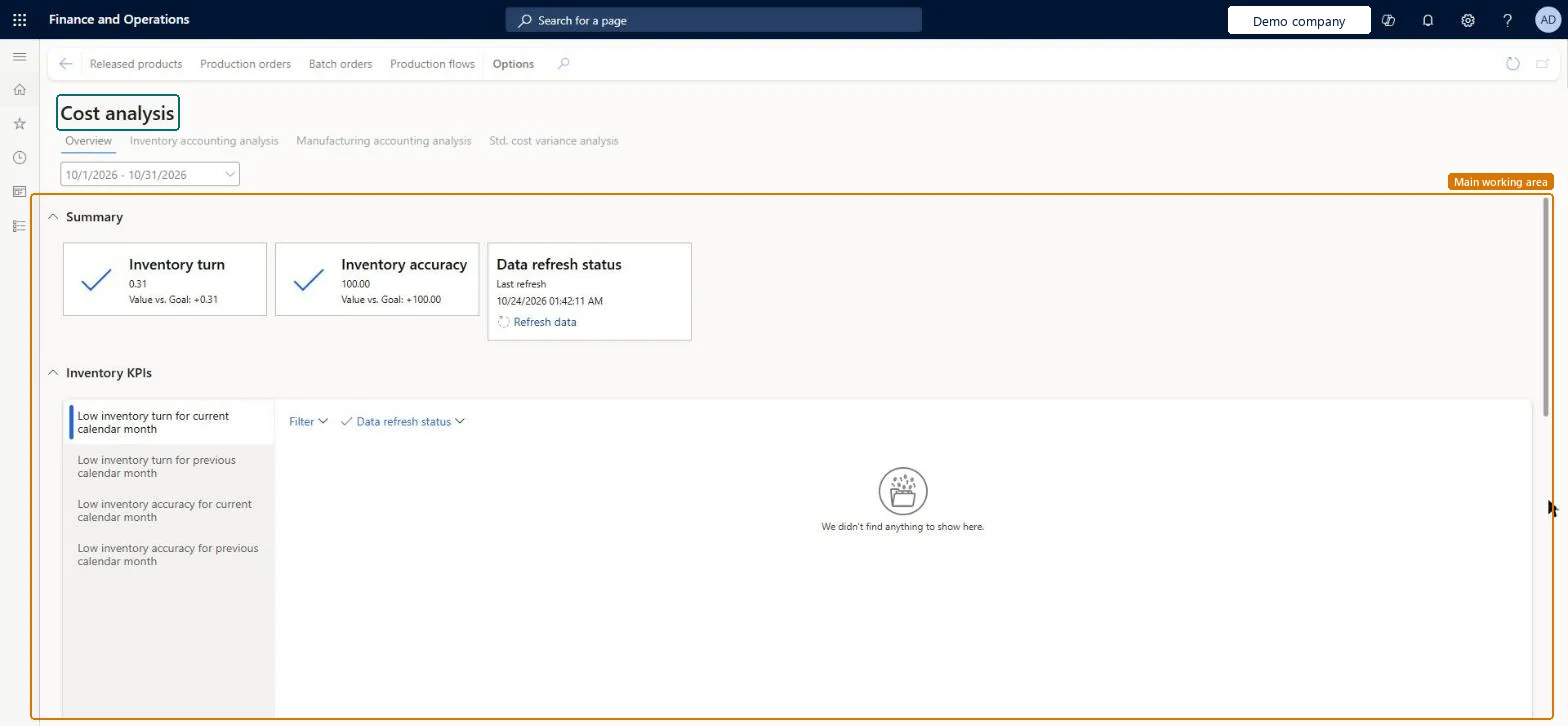
A workspace that shows inventory key performance indicators, such as inventory turn and inventory accuracy, together with Power BI analysis of inventory, manufacturing and standard cost variances.
Use the cost management workspace to analyze inventory costs in Dynamics 365 Finance
Menu item
CostAnalysisWorkspace
Show what matters for
PAGE GUIDEWhat the page does and how to use it6 sections. Choose a role to highlight what matters to you.
Everyone
1What it is and why
What it is
A workspace that shows inventory key performance indicators, such as inventory turn and inventory accuracy, together with Power BI analysis of inventory, manufacturing and standard cost variances.
What you do here
Use this workspace to analyse inventory and work in progress over time, find items with low inventory turn or low inventory accuracy, and review standard cost variances.
The page in Dynamics 365. page title tab to open what to set or check
About the examples: Examples and screenshots in this guide use BEAT, a demo company in a Dynamics 365 test environment. Use your own company's codes and values instead of copying them.
How to use it
Go to Cost management > Workspaces > Cost analysis.
Select the date range at the top of the Overview tab.
Review the Summary tiles for Inventory turn, Inventory accuracy and Data refresh status.
In the Inventory KPIs section, select a list such as Low inventory turn for current calendar month or Low inventory accuracy for previous calendar month, and use Filter to narrow it.
Select the Inventory accounting analysis, Manufacturing accounting analysis or Std. cost variance analysis tab to view the Power BI content.
On the Action Pane, select Released products, Production orders, Batch orders or Production flows to open those pages.
Source: Checked in Dynamics 365
Fields on the page
Field
What it means
Overview
The tab that shows data from the application, such as the summary tiles and inventory KPI lists.Microsoft Learn
Inventory accounting analysis
The tab that shows Power BI content for inventory details, ABC classification and inventory trends.Microsoft Learn
Manufacturing accounting analysis
The tab that shows Power BI content for work in progress trends.Microsoft Learn
Std. cost variance analysis
The tab that shows Power BI content for purchase price variances and production variances under standard cost.Microsoft Learn
Data refresh status
Shows when the cost data behind the Power BI content was last refreshed. A manual refresh can be run from this workspace.Microsoft Learn
Technical architect
4Technical
Menu item
CostAnalysisWorkspaceChecked in Dynamics 365
Form
CostAnalysisWorkspaceChecked in Dynamics 365
Who can open it
PrivilegesView the cost analysis workspace CostAnalysisWorkspaceViewDutiesInquire into the cost analysis workspace CostAnalysisWorkspaceInquireInquire into the cost analysis workspace and refresh underlying data CostAnalysisWorkspaceMaintain3 security rolesInventory accountant InventCostAccountantInventory accountant clerk InventCostCostClerkAccounting manager LedgerAccountingManagerChecked in Dynamics 365
Roles to set it up and use it
To use itInventory accountant InventCostAccountantInventory accountant clerk InventCostCostClerkAccounting manager LedgerAccountingManagerGive people one of these roles. On this system, 3 roles can open this page.Checked in Dynamics 365
Actions on the page
(Action Pane without tabs): Released products, Production orders, Batch orders, Production flowsChecked in Dynamics 365