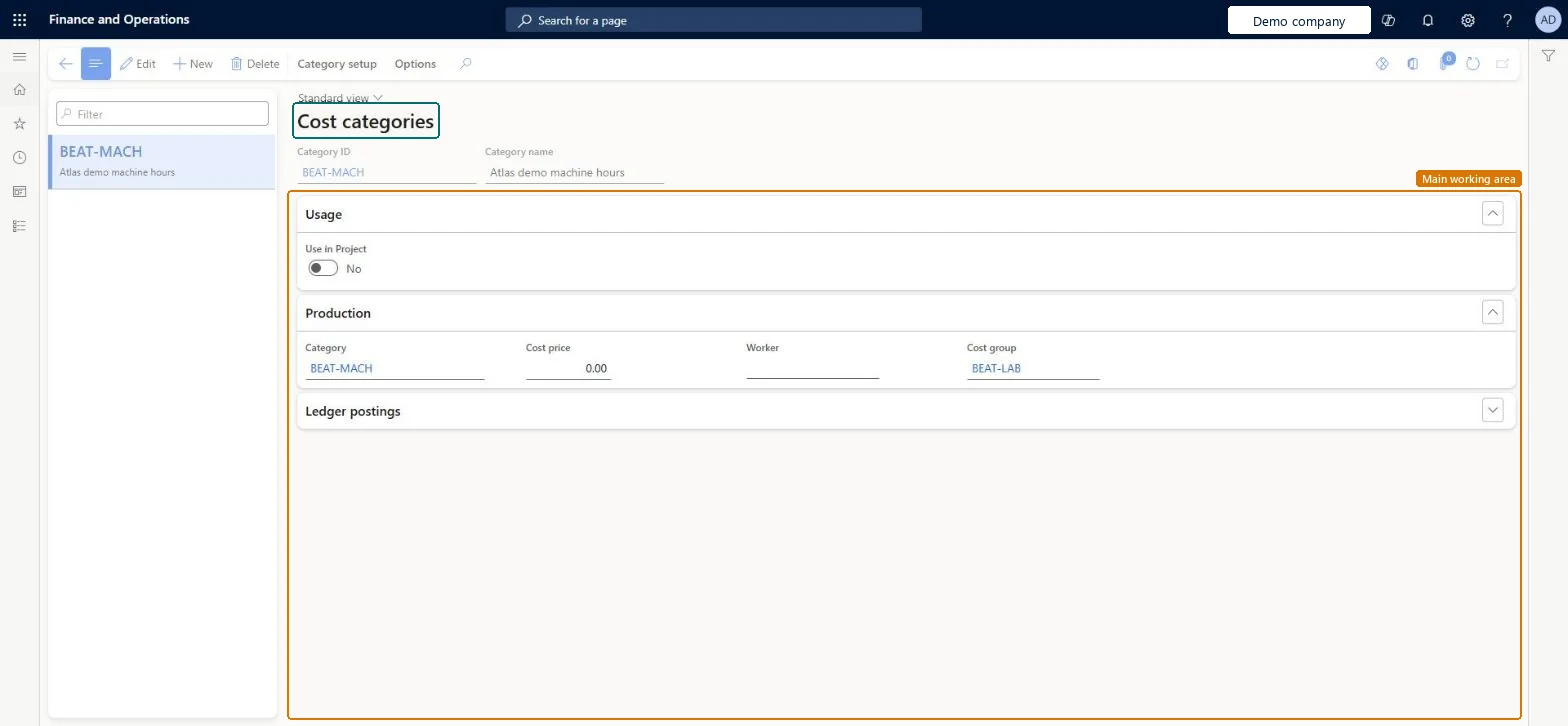
A setup page where you define cost categories, which are assigned to operations resources and routing operations to set hourly costs and to segment cost contributions in a manufactured item's calculated cost.
PAGE GUIDEWhat the page does and how to use it8 sections. Choose a role to highlight what matters to you.
Everyone
1What it is and why
What it is
A setup page where you define cost categories, which are assigned to operations resources and routing operations to set hourly costs and to segment cost contributions in a manufactured item's calculated cost.
What you do here
Use this page to create the cost categories that cost setup time, run time and quantity on routing operations, and to add the project information that is needed when a cost category is also used in Project management accounting.
Example
For example, you can create separate cost categories so that hourly costs differ between types of labour skills, machines or manufacturing cells.
The page in Dynamics 365. page title tab to open what to set or check
About the examples: Examples and screenshots in this guide use BEAT, a demo company in a Dynamics 365 test environment. Use your own company's codes and values instead of copying them.
Setup steps on this page
Set up Cost categories
Use this page to create the cost categories that cost setup time, run time and quantity on routing operations, and to add the project information that is needed when a cost category is also used in Project management accounting.
How to use it
Go to Cost management > Manufacturing accounting policies setup > Cost categories.
Select New and enter a Category ID and Category name.
On the Usage FastTab, set Use in Project if the cost category is also used in projects.
Complete the Project FastTab, such as Category group and Default line property, when the category is used in projects.
Expand the Cost accounts and Revenue accounts FastTabs to review the accounts for the category.
Select Save.
Source: Checked in Dynamics 365
Fields on the page
Field
What it means
Table column
Use in Project
Marks the cost category for use in projects as well as production. Additional project-related information must then be defined.Microsoft Learn
UseInProject
Category group
The project category group of the cost category. It must support a transaction type of Hours.Microsoft Learn
Default line property
Gives default information about how reported time can be charged to a project.Microsoft Learn
Cost accounts, Revenue accounts
Ledger accounts for costs and sales. They are typically defined on the category group, but specific accounts can be set for an individual cost category.Microsoft Learn
Test checklist
Create Setup and Run cost categories, each with a cost group of type direct manufacturing.
On Cost category price, enter a site-specific Pending record and activate it; check status Current active.
Assign the categories to a resource and a route operation.
Estimate a production order and check setup and run costs use the activated rates.
If Use in Project is selected, check the project category information is filled before saving.
Separate cost categories for setup time and run time wherever their rates or cost group differ, each with a cost group and a site-specific cost record in a costing version.Learn advises different cost categories when cost or cost group segmentation differs between setup and process time; cost records should be site-specific because costs differ between sites.
Entering cost records and not activating them: a Pending record isn't used to estimate production orders or value reported time until it is Current active.
Hard to reverse: Rates come from activated cost records in a costing version. A correction means a new record activated with a new effective date; time already reported stays at the old rate. Microsoft Learn
Technical architect
6Technical
Menu item
RouteCostCategoryChecked in Dynamics 365
Form
ProjCategoryChecked in Dynamics 365
Table
CategoryTableShown as “CATEGORY TABLE” in Record infoChecked in Dynamics 365
PrivilegesMaintain route cost categories RouteCostCategoryMaintainView route cost categories RouteCostCategoryViewDutiesEnable cost process InventCostCostProcessEnableInquire into cost master InventItemPriceCostMasterInquire3 security rolesInventory accountant InventCostAccountantInventory accountant clerk InventCostCostClerkAccounting manager LedgerAccountingManagerChecked in Dynamics 365
Roles to set it up and use it
To set it up or change itAccounting manager LedgerAccountingManagerTo use itInventory accountant InventCostAccountantInventory accountant clerk InventCostCostClerkGive people one of these roles. On this system, 3 roles can open this page.Checked in Dynamics 365
Actions on the page
Category setup: Category setupChecked in Dynamics 365
CategoryEntity (Category table): loaded for each company, in Microsoft's default template 410 - Production control.Load order: Microsoft's default template 410 - Production control loads Category table at execution unit 1, level 30, sequence 10. Lower levels load first, and entities at the same level load in sequence order.Load first: Shared category, the default templates at lower levels (System setup to General ledger)Microsoft Learn