Chief executive officer, Inventory accountant, Inventory accountant clerk and 8 more roles
Business process
Finalize and end production in Dynamics 365 Finance
Menu item
CostPmfProdTableDetailsList
Main table
ProdTable
Data entity
ProdBatchOrderHeaderEntity
Show what matters for
PAGE GUIDEWhat the page does and how to use it7 sections. Choose a role to highlight what matters to you.
Everyone
1What it is and why
What it is
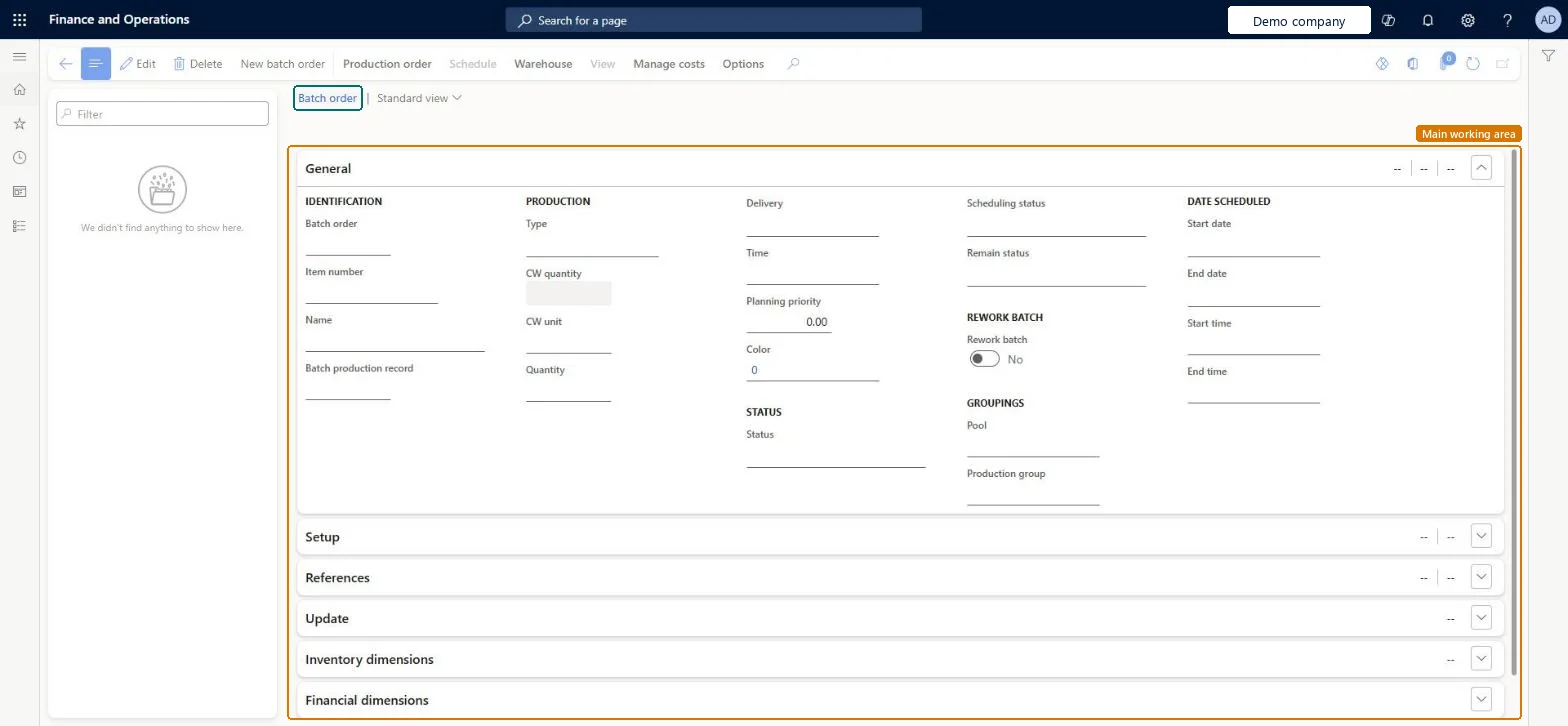
A details page that shows batch orders with their general, setup, reference, update, inventory dimension and financial dimension information.
What you do here
Use this page to review batch orders from a cost accounting point of view and to open their cost information from the Manage costs tab on the Action Pane.
The page in Dynamics 365. page title tab to open what to set or check
About the examples: Examples and screenshots in this guide use BEAT, a demo company in a Dynamics 365 test environment. Use your own company's codes and values instead of copying them.
How to use it
Go to Cost management > Manufacturing accounting > Batch orders.
Select a batch order in the list pane. Use the Filter field to find it.
On the General FastTab, review fields such as Batch order, Item number, Type, Quantity, CW quantity, Status, Rework batch, Production group and the scheduled start and end dates.
Expand the Setup, References, Update, Inventory dimensions and Financial dimensions FastTabs for more detail.
Open the Manage costs tab on the Action Pane to work with the costs of the order, or the Production order tab for order actions.
PrivilegesMaintain production orders costing details CostProdTableMaintainMaintain production orders ProdTableMaintainView production orders ProdTableViewDutiesInquire into cost status InventCostCostStatusInquireInquire into production cost calculations ProdProductionCostCalcStatusInquireMaintain production orders costing details ProdProductionCostDetailsMaintainMaintain production order creation ProdProductionOrderCreationMaintainMaintain production orders ProdProductionOrderMaintainMaintain production order preparation ProdProductionOrderPreparationMaintainInquire into production orders ProdProductionOrderProgressInquireReview production process ProdProductionProcessPerformanceReviewThis duty only include privileges that are accessible by the project manager and it does not contain the privileges related to sales order and purchase order ProjProjectItemTasksMaintain12 security rolesChief executive officer CompanyChiefExecutiveOfficerInventory accountant InventCostAccountantInventory accountant clerk InventCostCostClerkShop supervisor JmgShopSupervisorAccounting manager LedgerAccountingManagerMCRTestUserRoleProduction manager ProdProductionManagerProduction supervisor ProdProductionSupervisorProject assistant ProjProjectClerkProject manager ProjProjectManagerProduction planner ReqProductionPlannerSales clerk TradeSalesClerkChecked in Dynamics 365
Roles to set it up and use it
To set it up or change itInventory accountant InventCostAccountantProduction supervisor ProdProductionSupervisorProject manager ProjProjectManagerProject assistant ProjProjectClerkSales clerk TradeSalesClerkTo use itInventory accountant clerk InventCostCostClerkAccounting manager LedgerAccountingManagerProduction manager ProdProductionManagerChief executive officer CompanyChiefExecutiveOfficerProduction planner ReqProductionPlannerGive people one of these roles. On this system, 11 roles can open this page.Checked in Dynamics 365
Actions on the page
Production order: Maintain, Process, Inventory, Order details, Consolidated batch order, Print, Cases, Change, Engineering change management, CAPAScheduleWarehouse: General, Stop, ActionsViewManage costs: Order details, Calculations, Production accounting, Cost transactions, Standard cost transactions(Action Pane without tabs): New batch orderChecked in Dynamics 365
ProdBatchOrderHeaderEntity (Batch orders): loaded for each company.ProdProductionOrderHeaderEntity (Production orders): loaded for each company.Microsoft Learn