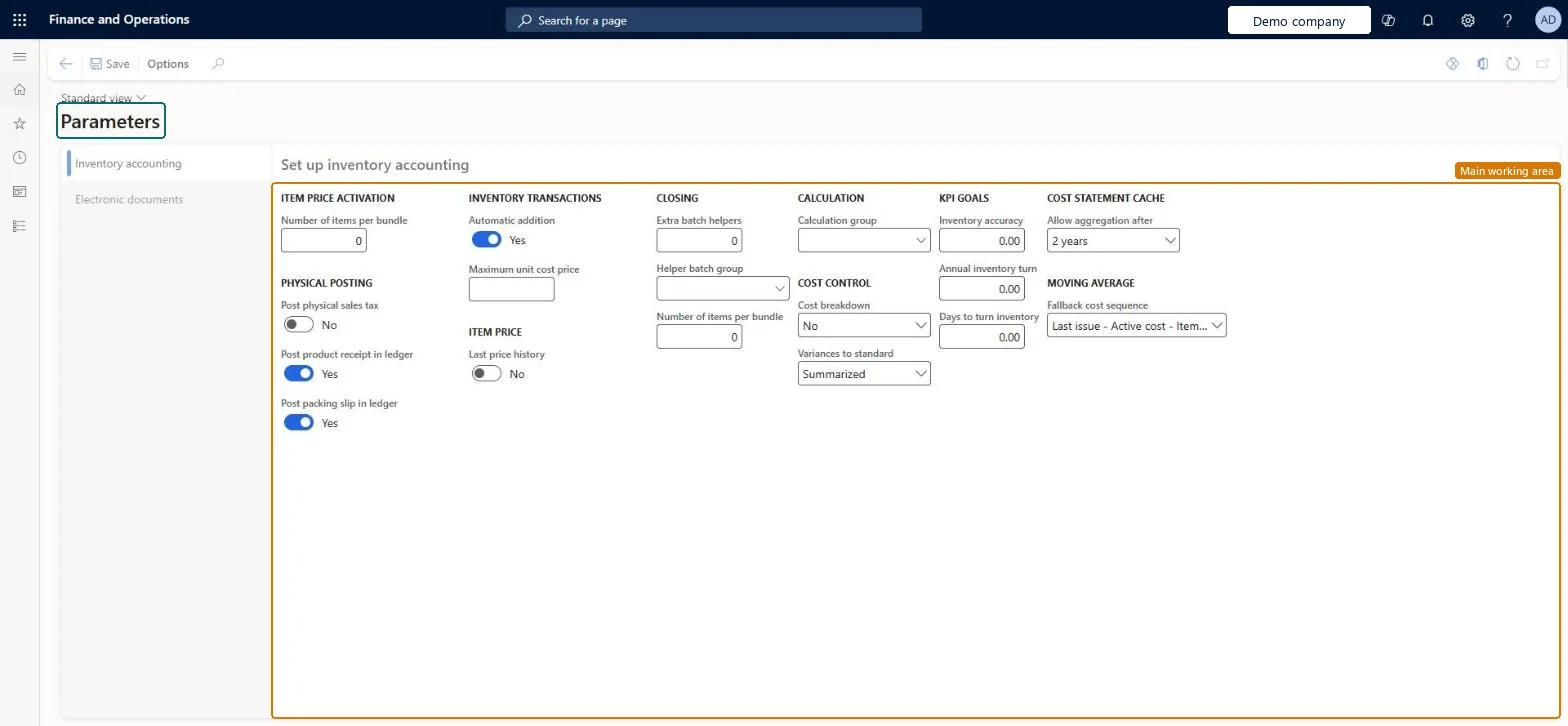
A setup page where you define the inventory accounting parameters, such as the cost control policies for standard cost items and the fallback cost sequence for moving average.
Production manager, Process engineer, Warehouse planner and 8 more roles
Business process
Define costing policies
Menu item
CostInventParameters
Setup steps
1 on this page
Show what matters for
PAGE GUIDEWhat the page does and how to use it8 sections. Choose a role to highlight what matters to you.
Everyone
1What it is and why
What it is
A setup page where you define the inventory accounting parameters, such as the cost control policies for standard cost items and the fallback cost sequence for moving average.
What you do here
Use this page to set the cost breakdown and variance policies for standard cost items and to choose the fallback cost sequence that moving average calculations use.
The page in Dynamics 365. page title tab to open what to set or check
About the examples: Examples and screenshots in this guide use BEAT, a demo company in a Dynamics 365 test environment. Use your own company's codes and values instead of copying them.
Setup steps on this page
Set up Parameters
Use this page to set the cost breakdown and variance policies for standard cost items and to choose the fallback cost sequence that moving average calculations use.
Steps from Microsoft
Go to Cost management > Inventory accounting policies setup > Parameters.
Select the Inventory accounting tab.
In the Moving average section, set the Fallback cost sequence field to Last issue - Active cost - Item price, Active cost - Last issue, or Active cost - Item price.
Select Sub ledger for an active cost breakdown that keeps cost group segmentation across a multilevel product structure for standard cost items, or None to calculate a manufactured item's standard cost as a single amount.Microsoft Learn
CostBreakdown
Variances to standard
Select Per cost group to identify purchase price variances and production variances by cost group, including the lot size, quantity, price and substitution variances, or Summarized to view only a summarized production variance.Microsoft Learn
ProdStandardCostVariance
Fallback cost sequence
Sets the order of preference among the last issue cost, the active cost and the item price when the system calculates moving average costs.Microsoft Learn
CostMovingAverageFallbackSequence
Test checklist
Set Cost breakdown and Variances to standard
Activate a calculated cost for a manufactured standard cost item
Open the item price and check the cost group breakdown is stored
End a production order and check the variances by cost group
Cost breakdown = Sub ledger and Variances to standard = Per cost group for manufacturers using standard costLearn calls the active (Sub ledger) cost breakdown critical for keeping cost group segmentation across multilevel standard cost items, and Per cost group is needed to see the four production variances (lot size, quantity, price, substitution).
Hard to reverse: You can change the policies, but they act when costs are activated and variances posted. Costs already activated and variances already posted keep the old segmentation. Microsoft Learn
Technical architect
6Technical
Menu item
CostInventParametersChecked in Dynamics 365
Form
InventParametersChecked in Dynamics 365
Who can open it
DutiesEnable warehouse operation process WMSWarehouseOperationProcessEnableMaintain BOM master BOMBillsOfMaterialsMasterMaintainInquire into BOM management policies BOMBillsOfMaterialsMgmtPoliciesInquireEnable BOM management process BOMBillsOfMaterialsMgmtProcessEnableInquire into costing policies CostPoliciesInquireMaintain costing policies CostPoliciesMaintainView the cost management content pack in Power BI CostPowerBIContentPackViewEnable cost process InventCostCostProcessEnableInquire into quality control policies InventQualityControlPoliciesInquireEnable quality control process InventQualityControlProcessEnableEnable shipping process InventShippingProcessEnableEnable inventory valuation process InventStdCostInvValuationProcessEnableInquire into inventory valuation policies (cur.) InvStdCostInvValuatPoliciesSecInquire_RUInquire into warehouse operation policies WMSWarehouseOperationPoliciesInquire11 security rolesProduction manager ProdProductionManagerProcess engineer RouteProcessEngineerWarehouse planner WHSWarehousePlannerWarehouse manager WMSWarehouseManagerProduct design manager BOMProductDesignManagerInventory accountant InventCostAccountantInventory accountant clerk InventCostCostClerkMaterials manager InventMaterialsManagerQuality control manager InventQualityControlManagerAccounting manager LedgerAccountingManagerFinancial controller LedgerFinancialControllerChecked in Dynamics 365
Roles to set it up and use it
To set it up or change itAccounting manager LedgerAccountingManagerProduct design manager BOMProductDesignManagerQuality control manager InventQualityControlManagerWarehouse manager WMSWarehouseManagerTo use itInventory accountant InventCostAccountantInventory accountant clerk InventCostCostClerkProduction manager ProdProductionManagerFinancial controller LedgerFinancialControllerProcess engineer RouteProcessEngineerGive people one of these roles. On this system, 12 roles can open this page.Checked in Dynamics 365