- Used by
- Maintenance clerk, Maintenance manager
- Menu item
EntAssetWorkOrderWorkspace
PAGE GUIDEWhat the page does and how to use it6 sections. Choose a role to highlight what matters to you.
Everyone1What it is and why
Functional consultant · Solution architect2Where it fits
| Menu path | Asset management › Workspaces › Work order management |
|---|
End user · Functional consultant3How to do it
About the examples: Examples and screenshots in this guide use BEAT, a demo company in a Dynamics 365 test environment. Use your own company's codes and values instead of copying them.
How to use it
- Go to Asset management > Workspaces > Work order management.
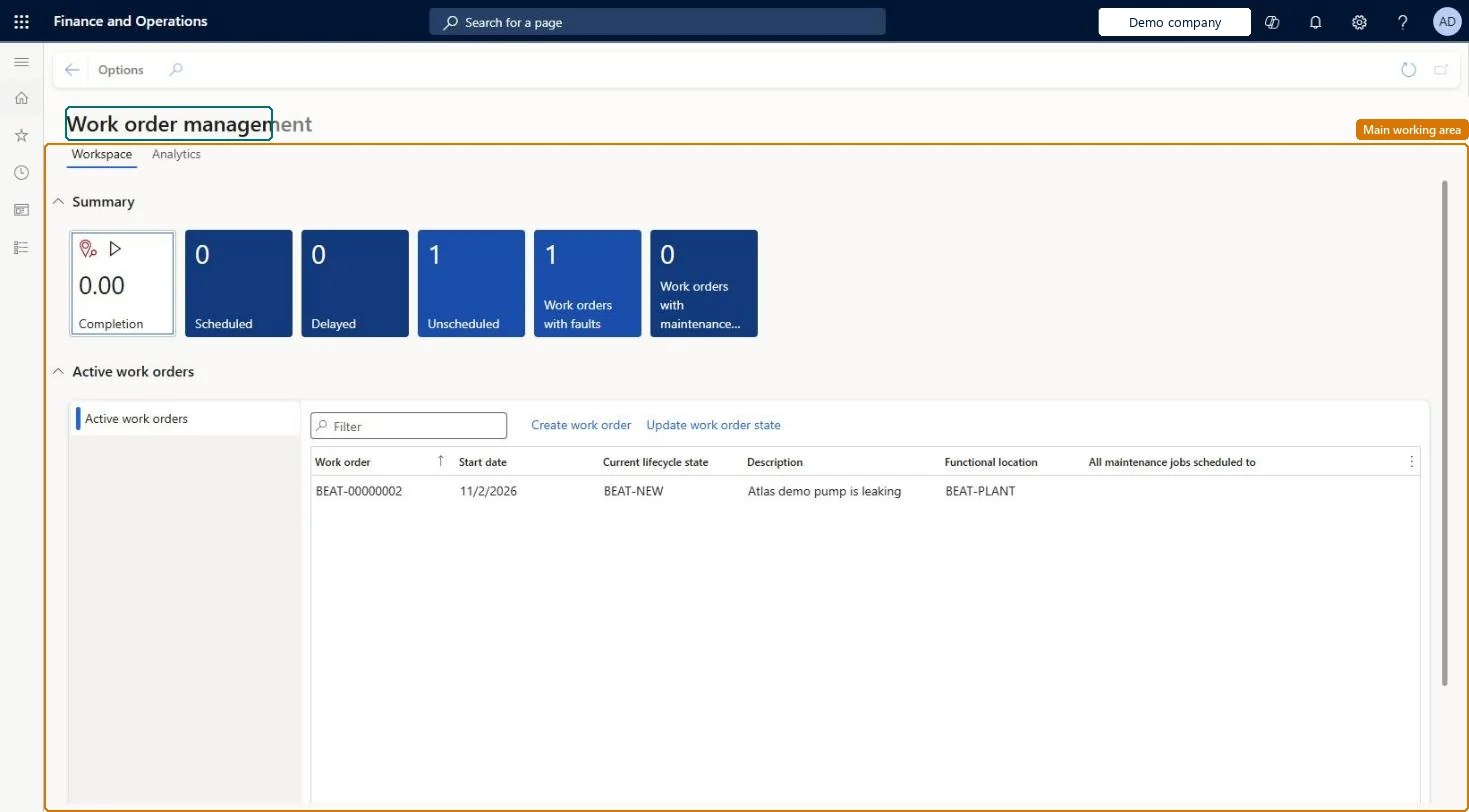
- Review the Summary tiles: Completion, Scheduled, Delayed, Unscheduled, Work orders with faults and Work orders with maintenance downtime.
- Under Active work orders, use the Filter box to find a work order.
- Review the Work order, Start date, Current lifecycle state, Description and Functional location columns.
- Select Create work order to add a work order, or select a work order and select Update work order state.
- Open the Analytics tab for charts.
Source: Checked in Dynamics 365
Technical architect4Technical
| Menu item | EntAssetWorkOrderWorkspace Checked in Dynamics 365 |
|---|---|
| Form | EntAssetWorkOrderWorkspace Checked in Dynamics 365 |
| Who can open it | PrivilegesWork order workspace maintain EntAssetWorkOrderWorkspaceMaintainWork order workspace view EntAssetWorkOrderWorkspaceViewDutiesWork order workspace EntAssetWorkOrderWorkspace2 security rolesMaintenance clerkEntAssetMaintenanceClerkMaintenance manager EntAssetMaintenanceManager |
| Roles to set it up and use it | To set it up or change itMaintenance manager EntAssetMaintenanceManagerMaintenance clerk EntAssetMaintenanceClerkGive people one of these roles. On this system, 2 roles can open this page.Checked in Dynamics 365 |
Developer5Developer
| Open it by URL | https://<your-environment>/?mi=EntAssetWorkOrderWorkspace |
|---|
Everyone6Sources
- Checked in a working Dynamics 365 system, version 10.0.49: the menu item, form, table and security, the page.