BeyondERP.Newsletter
Menu

Inquiry page · Asset management

Item forecast

An inquiry that calculates the expected item consumption, spare parts and other items, from maintenance schedule lines and work orders for a period.

Business process
Forecast hours expenses and items for work orders in Dynamics 365 Supply Chain Management
Menu item
EntAssetItemForecast
Show what matters for
PAGE GUIDEWhat the page does and how to use it6 sections. Choose a role to highlight what matters to you.
Everyone

1What it is and why

What it isAn inquiry that calculates the expected item consumption, spare parts and other items, from maintenance schedule lines and work orders for a period.
What you do hereUse this page to see which items maintenance work will need in a period, grouped the way you choose, for all assets or selected assets.
ExampleFor example, before a planned stop, a planner calculates the item forecast for the stop to see which spare parts the jobs will need.
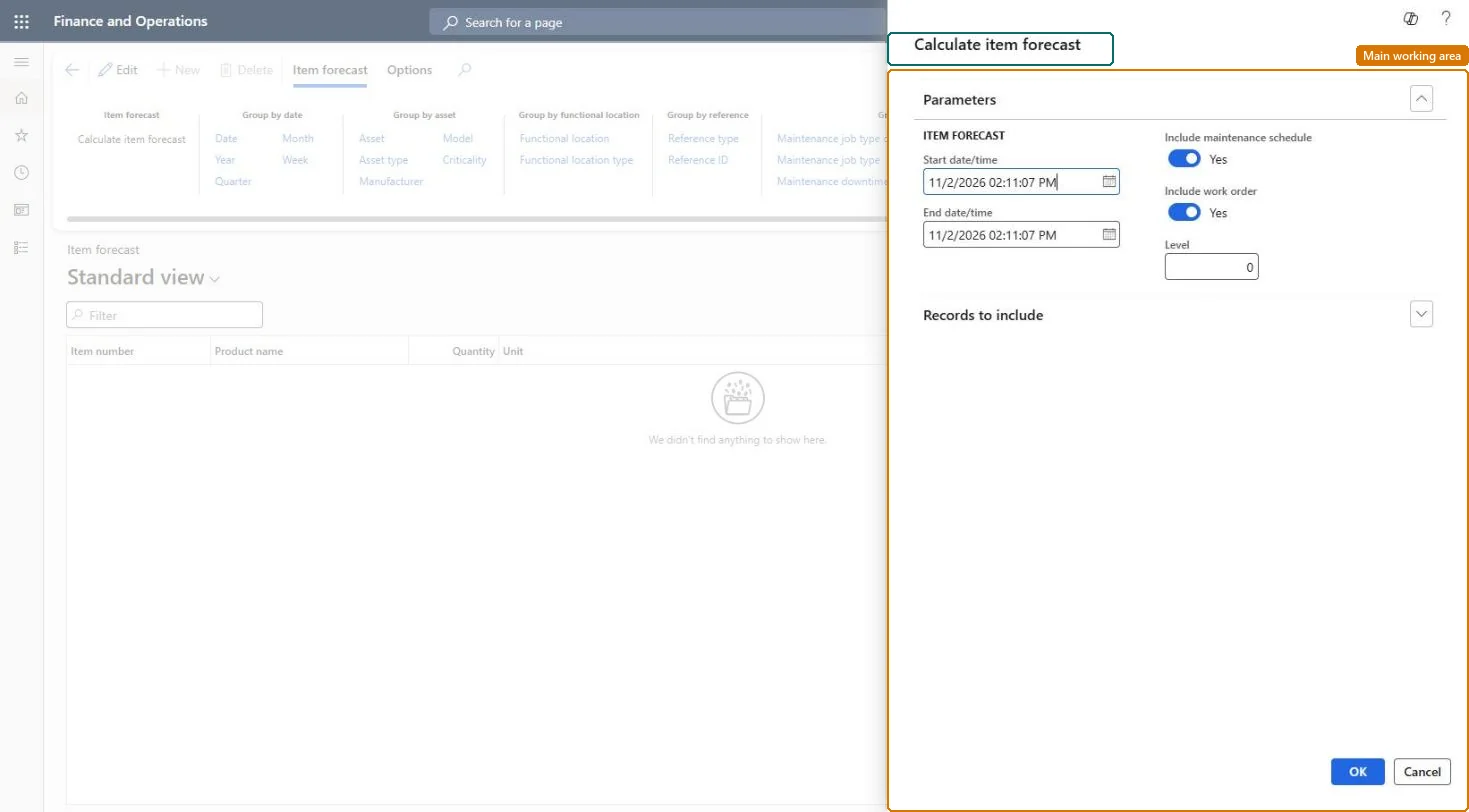
Item forecast page in Dynamics 365
The page in Dynamics 365. page title tab to open what to set or check
Functional consultant · Solution architect

2Where it fits

End user · Functional consultant

3How to do it

About the examples: Examples and screenshots in this guide use BEAT, a demo company in a Dynamics 365 test environment. Use your own company's codes and values instead of copying them.

Steps from Microsoft

  1. Go to Asset management > Inquiries > Item forecast.
  2. In the Calculate item forecast dialog, enter the period in the Start date/time and End date/time fields.
  3. Set Include maintenance schedule and Include work order to Yes or No.
  4. In the Level field, enter how detailed the result should be for functional locations.
  5. Select OK.
  6. Use the Group by buttons to choose the level of detail.

Source: Microsoft Learn

Fields on the page

FieldWhat it means
Start date/time and End date/timeThe period the item forecast is calculated for.Microsoft Learn
Include maintenance scheduleIncludes maintenance schedule lines in the calculation.Microsoft Learn
Include work orderIncludes work order jobs in the calculation.Microsoft Learn
LevelSets how detailed the forecast lines are for functional locations; 0 shows every level.Microsoft Learn
Display dimensionsShows the product, storage, or tracking dimensions of the items.Microsoft Learn
Technical architect

4Technical

Menu itemEntAssetItemForecast Checked in Dynamics 365
FormDialog Checked in Dynamics 365
Roles to set it up and use itTo set it up or change itMaintenance manager EntAssetMaintenanceManagerMaintenance clerk EntAssetMaintenanceClerkTo use itMaintenance worker EntAssetMaintenanceWorkerGive people one of these roles. On this system, 3 roles can open this page.Checked in Dynamics 365
Developer

5Developer

Open it by URLhttps://<your-environment>/?mi=EntAssetItemForecast
Everyone

6Sources