BeyondERP.Newsletter
Menu

Inquiry page · Asset management

Asset hour control

An inquiry page that calculates actual hours against budget hours on assets, where actual hours come from posted transactions.

Business process
Analyze maintenance costs
Menu item
EntAssetHourControl_Object
Show what matters for
PAGE GUIDEWhat the page does and how to use it6 sections. Choose a role to highlight what matters to you.
Everyone

1What it is and why

What it isAn inquiry page that calculates actual hours against budget hours on assets, where actual hours come from posted transactions.
What you do hereUse this page to compare forecast (budget) hours with actual and committed hours on assets, optionally including sub assets.
ExampleFor example, a maintenance manager selects several assets on the All assets page, selects Hour control, and sees their budget and actual hours side by side.
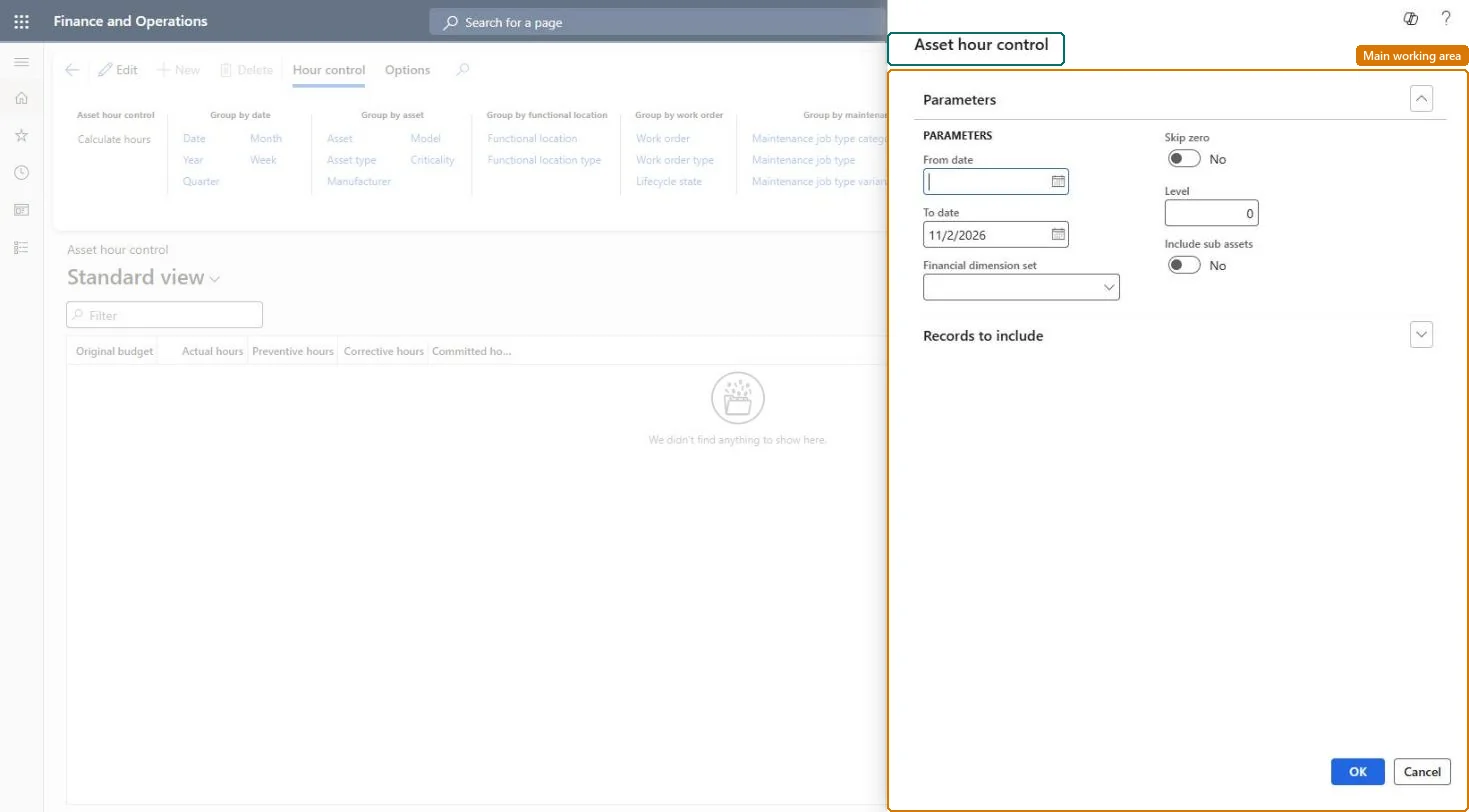
Asset hour control page in Dynamics 365
The page in Dynamics 365. page title tab to open what to set or check
Functional consultant · Solution architect

2Where it fits

Business processAnalyze assets › Analyze maintenance costs
Menu pathAsset management › Inquiries › Assets › Asset hour control
Set up firstWork order maintenance forecast Microsoft Learn
Related pagesFunctional location hour control Microsoft Learn Work order hour control Microsoft Learn
End user · Functional consultant

3How to do it

About the examples: Examples and screenshots in this guide use BEAT, a demo company in a Dynamics 365 test environment. Use your own company's codes and values instead of copying them.

Steps from Microsoft

  1. Go to Asset management > Inquiries > Assets > Asset hour control.
  2. In the Asset hour control dialog, enter the From date and To date.
  3. If required, select a financial dimension set, and set Skip zero and Include sub assets as needed.
  4. On the Records to include FastTab, select specific assets to limit the calculation.
  5. Select OK to start the calculation.
  6. Select the Group by buttons for the detail level you want.

Source: Microsoft Learn

Fields on the page

FieldWhat it means
Original budgetBudget hours taken from the work order forecast.Microsoft Learn
Actual hoursHours posted on work orders.Microsoft Learn
Committed hoursTotal hours your company is committed to for work orders.Microsoft Learn
Skip zeroHides results that contain zero hours.Microsoft Learn
LevelHow detailed the lines are for functional locations; 0 shows every level.Microsoft Learn
Include sub assetsShows sub assets as separate lines.Microsoft Learn
Technical architect

4Technical

Menu itemEntAssetHourControl_Object Checked in Dynamics 365
FormDialog Checked in Dynamics 365
Roles to set it up and use itTo set it up or change itMaintenance manager EntAssetMaintenanceManagerMaintenance clerk EntAssetMaintenanceClerkMaintenance worker EntAssetMaintenanceWorkerGive people one of these roles. On this system, 3 roles can open this page.Checked in Dynamics 365
Developer

5Developer

Open it by URLhttps://<your-environment>/?mi=EntAssetHourControl_Object
Everyone

6Sources