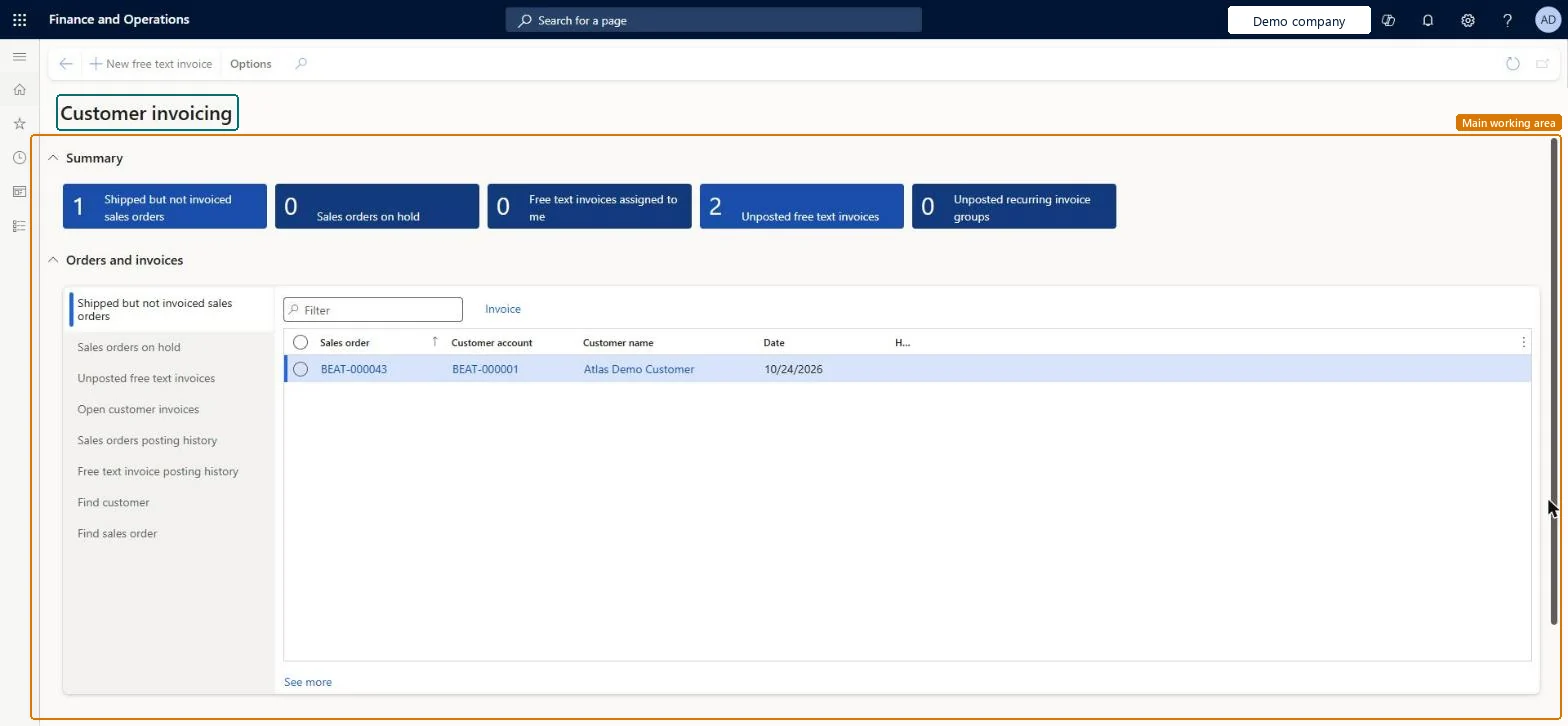
A workspace that gives an overview of customer invoice posting. With the Customer invoice logging framework it shows counts of posted and errored sales order and free text invoices.
PAGE GUIDEWhat the page does and how to use it7 sections. Choose a role to highlight what matters to you.
Everyone
1What it is and why
What it is
A workspace that gives an overview of customer invoice posting. With the Customer invoice logging framework it shows counts of posted and errored sales order and free text invoices.
What you do here
Use this workspace to review invoice posting results and drill into them; selecting the Posted or Error count opens the details, including posting history for the past 14 days by default.
Example
When a sales order or free text invoice fails to post, select the Error count to open the Error details tab, which shows the specific posting error messages.
The page in Dynamics 365. page title tab to open what to set or check
About the examples: Examples and screenshots in this guide use BEAT, a demo company in a Dynamics 365 test environment. Use your own company's codes and values instead of copying them.
How to use it
Go to Accounts receivable > Workspaces > Customer invoicing.
In Summary, review the tiles Shipped but not invoiced sales orders, Sales orders on hold, Free text invoices assigned to me, Unposted free text invoices and Unposted recurring invoice groups.
In Orders and invoices, select a list on the left, such as Sales orders on hold, Open customer invoices or Sales orders posting history.
Type in the Filter box to narrow the list, and select Invoice to invoice the selected sales order.
Select New free text invoice in the Action Pane to start a free text invoice.
Source: Checked in Dynamics 365
Fields on the page
Field
What it means
Posted
Count of posted sales order and free text invoices; select it to see the details.Microsoft Learn
Error
Count of invoices that failed to post; select it to see the error messages.Microsoft Learn
Sales order posting history
Tab that lists recent sales order invoice postings, the last 14 days by default.Microsoft Learn
Free text invoice posting history
Tab that lists recent free text invoice postings, the last 14 days by default.Microsoft Learn
Solution architect
4Design impact
If you change it later
The Number of days to retain customer logging data parameter controls how long posting history is kept; older entries are cleaned up by a daily data maintenance job. Microsoft Learn
To use itAccounts receivable manager CustInvoiceAccountsReceivableManagerAccounts receivable clerk CustInvoiceAccountsReceivableClerkGive people one of these roles. On this system, 2 roles can open this page.Checked in Dynamics 365
Actions on the page
Buttons: New free text invoiceChecked in Dynamics 365