PAGE GUIDEWhat the page does and how to use it7 sections. Choose a role to highlight what matters to you.
Everyone
1What it is and why
What it is
The Customer account statement report page, which produces statements you can send to customers.
What you do here
Use this page to generate account statements that notify customers of their balance due and transaction activity for a period, with options such as only open transactions, credit limit, and maturity distribution.
Example
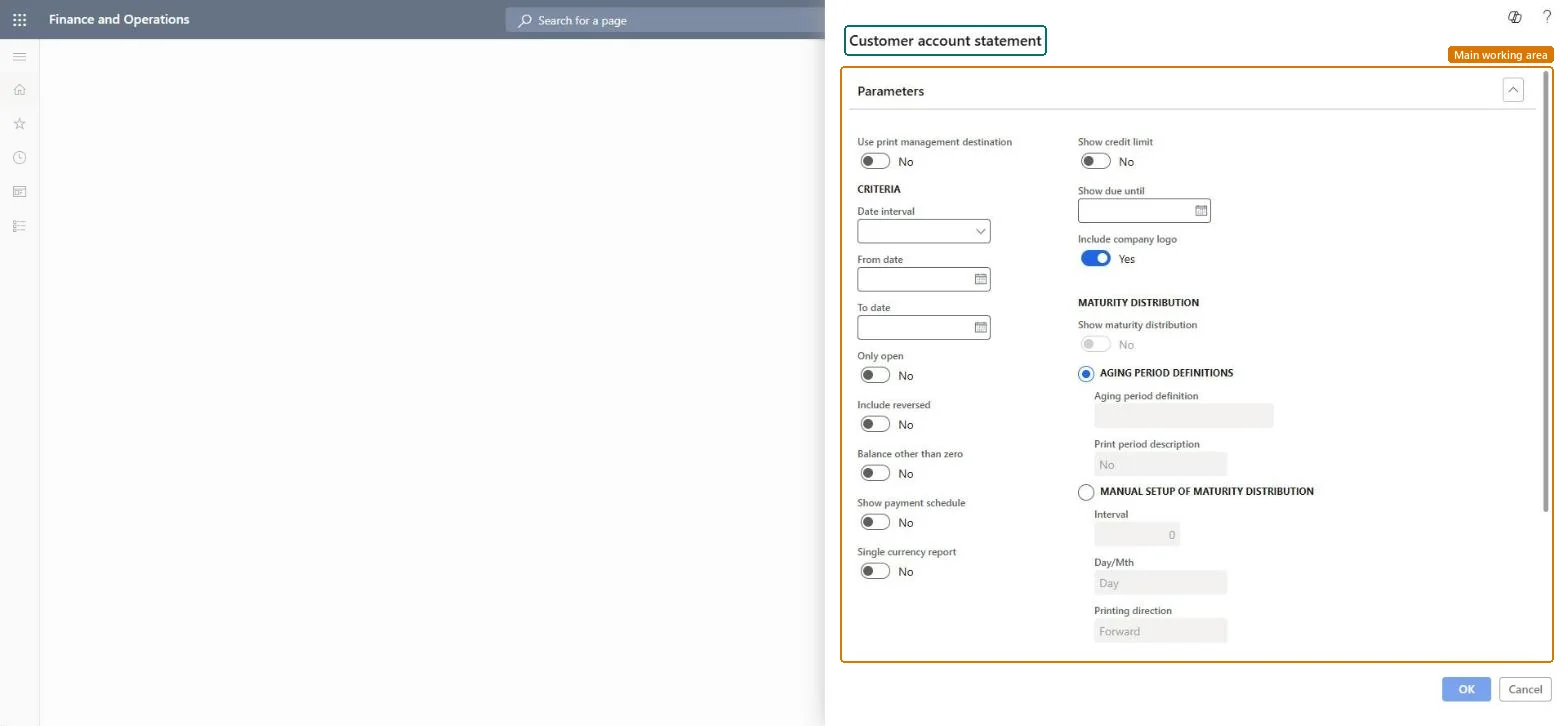
Using Show due until to add a separate section with the amount, transactions and due date of the customer's next payment to the statement.
The page in Dynamics 365. page title tab to open what to set or check
About the examples: Examples and screenshots in this guide use BEAT, a demo company in a Dynamics 365 test environment. Use your own company's codes and values instead of copying them.
When to run it
When to run it
At the end of each statement period, after payments and invoices for the period are posted, when statements go out to many customers at once.
How often
Once per statement cycle, typically monthly.
Batch settings
Schedule the periodic run in the background when statements for many customers are generated and sent by print management.
What the output shows
One statement per customer with the transactions in the period, the balance due and, if selected, the credit limit and the maturity distribution at the bottom. A customer missing from the run usually has a zero balance while Balance other than zero is on.
Go to Accounts receivable > Periodic tasks > Customer account statement.
Pick a Date interval, or enter the From date and To date that the statement covers.
Turn on Only open to print just unsettled transactions, and Balance other than zero to skip customers with a zero closing balance.
Set Show credit limit and Include company logo; leaving the logo off saves database space.
Under Maturity distribution, choose an Aging period definition with no more than six periods, or Manual setup of maturity distribution, then run the periodic statement run for the filtered customers.
Leaves out statements whose closing balance is zero.Microsoft Learn
Show credit limit
Shows the customer's credit limit on the statement.Microsoft Learn
Show maturity distribution
Prints the aging of the balance at the bottom of the statement.Microsoft Learn
Aging period definition
The aging periods used for the maturity distribution; definitions with more than six columns can't be used.Microsoft Learn
Use print management destination
Uses the customer's print management destination when the statements are generated.Microsoft Learn
Include company logo
Adds the company logo for report designs that show it; leaving it off saves database space.Microsoft Learn
Solution architect
4Design impact
Can it be undone
Nothing to undo: Generating statements doesn't change customer data. Statements already sent can't be recalled. Microsoft Learn
Technical architect
5Technical
Menu item
output:CustAccountStatementExtChecked in Dynamics 365
Form
SysOperationTemplateFormChecked in Dynamics 365
Roles to set it up and use it
To use itAccounts receivable manager CustInvoiceAccountsReceivableManagerAccounts receivable clerk CustInvoiceAccountsReceivableClerkAccounting manager LedgerAccountingManagerCollections manager CollectionLetterCollectionsManagerAccounts receivable payments clerk PaymAccountsReceivablePaymentsClerkGive people one of these roles. On this system, 11 roles can run this page.Checked in Dynamics 365