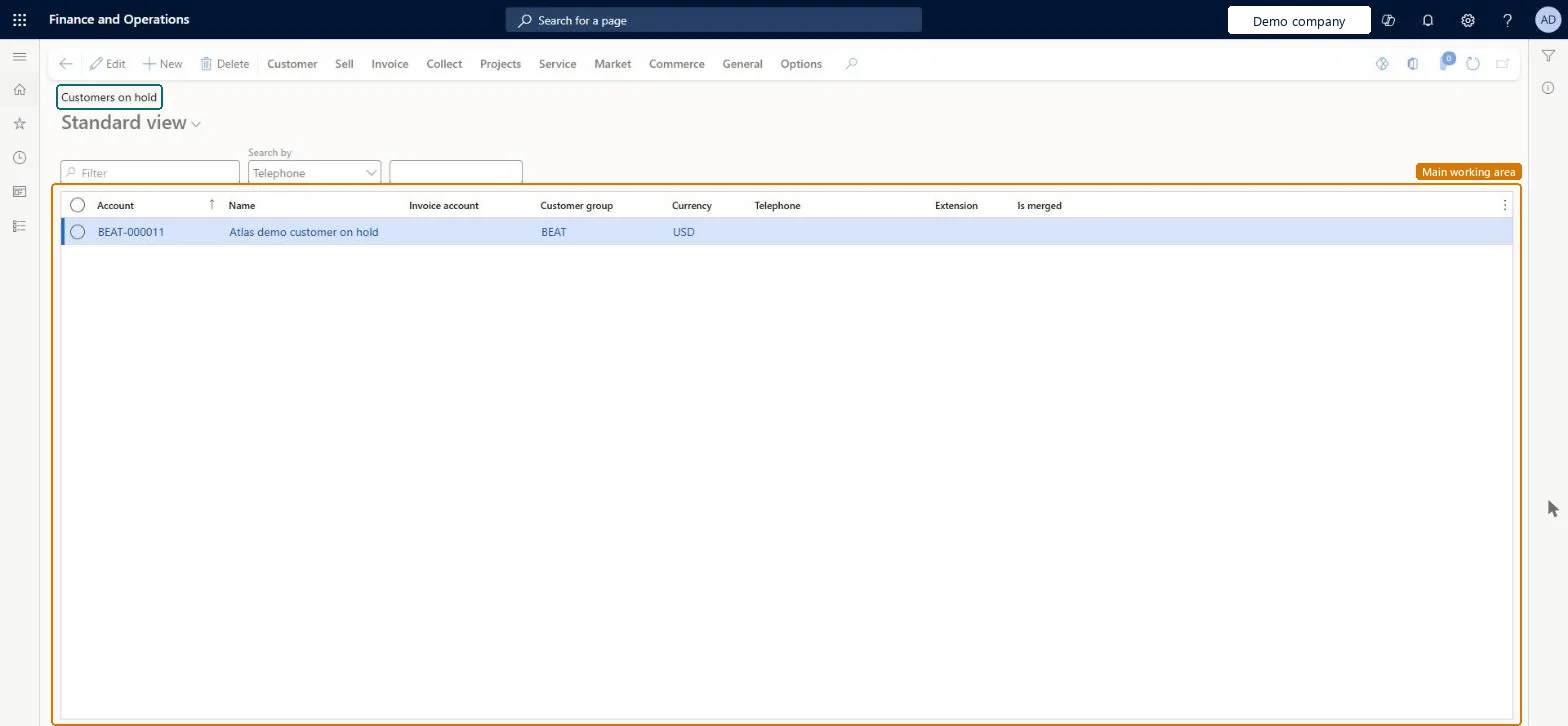
A list page that shows customer accounts that are on hold, with each customer's account, name, invoice account, customer group, currency, telephone and extension.
Accounts receivable clerk, Accounts receivable manager, Auditor and 32 more roles
Business process
Monitor customer credit
Menu item
CustTableHoldListPage
Main table
CustTable
Data entity
CustCustomerBaseEntity
Show what matters for
PAGE GUIDEWhat the page does and how to use it7 sections. Choose a role to highlight what matters to you.
Everyone
1What it is and why
What it is
A list page that shows customer accounts that are on hold, with each customer's account, name, invoice account, customer group, currency, telephone and extension.
What you do here
Use this page to review the customers that are on hold and to open the usual customer actions from the Action Pane, such as Customer, Sell, Invoice and Collect.
The page in Dynamics 365. page title tab to open what to set or check
Accounts receivable › Customers › Customers on hold
End user · Functional consultant
3How to do it
About the examples: Examples and screenshots in this guide use BEAT, a demo company in a Dynamics 365 test environment. Use your own company's codes and values instead of copying them.
How to use it
Go to Accounts receivable > Customers > Customers on hold.
Type in the Filter box, or choose a Search by field such as Telephone and enter a value, to find a customer.
Review the Account, Name, Invoice account, Customer group, Currency, Telephone and Extension columns.
Select a customer and select Edit to change it, or select New to add one.
Use the Action Pane tabs Customer, Sell, Invoice and Collect to open the related actions for the selected customer.
Source: Checked in Dynamics 365
Common errors and fixes
Message
What to do
Shipment %1 cannot be confirmed because customer is on hold for %2.
Open the customer from All customers and, on the Credit and collections FastTab, set Invoicing and delivery on hold to No. Repeat for every blocked customer on the load. Microsoft Learn
Test checklist
On a test customer, set Invoicing and delivery on hold to a hold value on the Credit and collections FastTab.
Open Customers on hold and check that the customer is listed.
Try to confirm a shipment for that customer and check that confirmation is blocked with the on-hold message.
Set Invoicing and delivery on hold to No, refresh the list and check that the customer no longer appears and the shipment can be confirmed.
Reversible: A customer is on hold through the Invoicing and delivery on hold field on the customer's Credit and collections FastTab. Set it back to No to release the customer; blocked shipments can then be confirmed. Microsoft Learn
Technical architect
5Technical
Menu item
CustTableHoldListPageChecked in Dynamics 365
Form
CustTableChecked in Dynamics 365
Table
CustTableShown as “Customers” in Record infoChecked in Dynamics 365
PrivilegesMaintain Customers on hold list page CustTableHoldListPageMaintainView customer accounts on hold list page CustTableHoldListPageViewView customer records (financials) CustTableViewDutiesReview collections process performance CollectionLetterCollectionProcPerfRevieInquire into collections status CollectionLetterCollectionsStatusInquirInquire into customer master CustCustomerMasterInquireInquire into customer master CustCustomerMasterInquireWithoutTaxViewInquire into customer invoice status CustInvoiceCustomerInvoiceStatusInquireMaintain open customer transactions CustInvoiceCustTransOpenMaintainReview invoice and cash process performance CustInvoiceInvoiceAndCashProcPerfReviewInquire into customer payments status PaymCustomerPaymentsStatusInquireInquire into customer positive payments PaymCustPositivePayInquireInquire into customer master RentalCustCustomerMasterInquireInquire into customer fleet item details RentalCustomerRentalItemDetailsInquire37 security rolesAuditor AuditPolicyManagerCollections agent CollectionLetterCollectionsAgentCollections manager CollectionLetterCollectionsManagerChief executive officer CompanyChiefExecutiveOfficerChief financial officer CompanyChiefFinancialOfficerMarketing coordinator CRMMarketingCoordinatorMarketing manager CRMMarketingManagerAccounts receivable clerk CustInvoiceAccountsReceivableClerkAccounts receivable manager CustInvoiceAccountsReceivableManagerCustTableCopilotSummaryInsufficientAccessTestRoleAccountant LedgerAccountantAccounting manager LedgerAccountingManagerAccounting supervisor LedgerAccountingSupervisorFinancial controller LedgerFinancialControllerMCRTestUserRoleAccounts receivable centralized payments clerk PaymAccountsReceivableCentralPaymClerkAccounts receivable payments clerk PaymAccountsReceivablePaymentsClerkAccounts payable positive payment clerk PaymPositivePaymentClerkTreasurer PaymTreasurerProject manager ProjProjectManagerProject supervisor ProjProjectSupervisorRental clerk RentalClerkRental coordinator agent RentalCoordinatorAgentRental manager RentalManagerRental purchasing manager RentalPurchasingManagerRental representative RentalRepresentativeRental sales manager RentalSalesManagerRetail operations manager RetailOperationsManagerRetail service RetailServiceRetail store manager RetailStoreManagerService dispatcher SMADispatcherService delivery manager SMAServiceDeliveryManagerCustomer service manager TradeCustomerServiceManagerCustomer service representative TradeCustomerServiceRepresentativeSales clerk TradeSalesClerkSales manager TradeSalesManagerSales representative TradeSalesRepresentativeChecked in Dynamics 365
Roles to set it up and use it
To set it up or change itAccounts receivable manager CustInvoiceAccountsReceivableManagerCollections manager CollectionLetterCollectionsManagerTo use itAccounts receivable clerk CustInvoiceAccountsReceivableClerkAccounting manager LedgerAccountingManagerAccounts receivable payments clerk PaymAccountsReceivablePaymentsClerkAccounts receivable centralized payments clerk PaymAccountsReceivableCentralPaymClerkAccounting supervisor LedgerAccountingSupervisorGive people one of these roles. On this system, 35 roles can open this page.Checked in Dynamics 365
Actions on the page
Customer: Accounts, Transactions, Balance, Forecast, Set up, Attachments, Catalogs, Customer service, Registration, PropertiesSell: New, Related information, Trade agreements, Set up, Approved customerInvoice: New, Set up, Journals, Related informationCollect: New, Collection letters, Interest note adjustment, Interest, Customer balances, Settle, DeductionsProjects: New, Project control, Related informationService: New, Related informationMarket: Campaigns, Telemarketing, MailingsCommerce: Related information, Media, Attributes, LoyaltyGeneral: New, Activities, Accounts, Set up, StatisticsChecked in Dynamics 365