BeyondERP.Newsletter
Menu

Transaction page · Accounts payable

Payment journals assigned to me

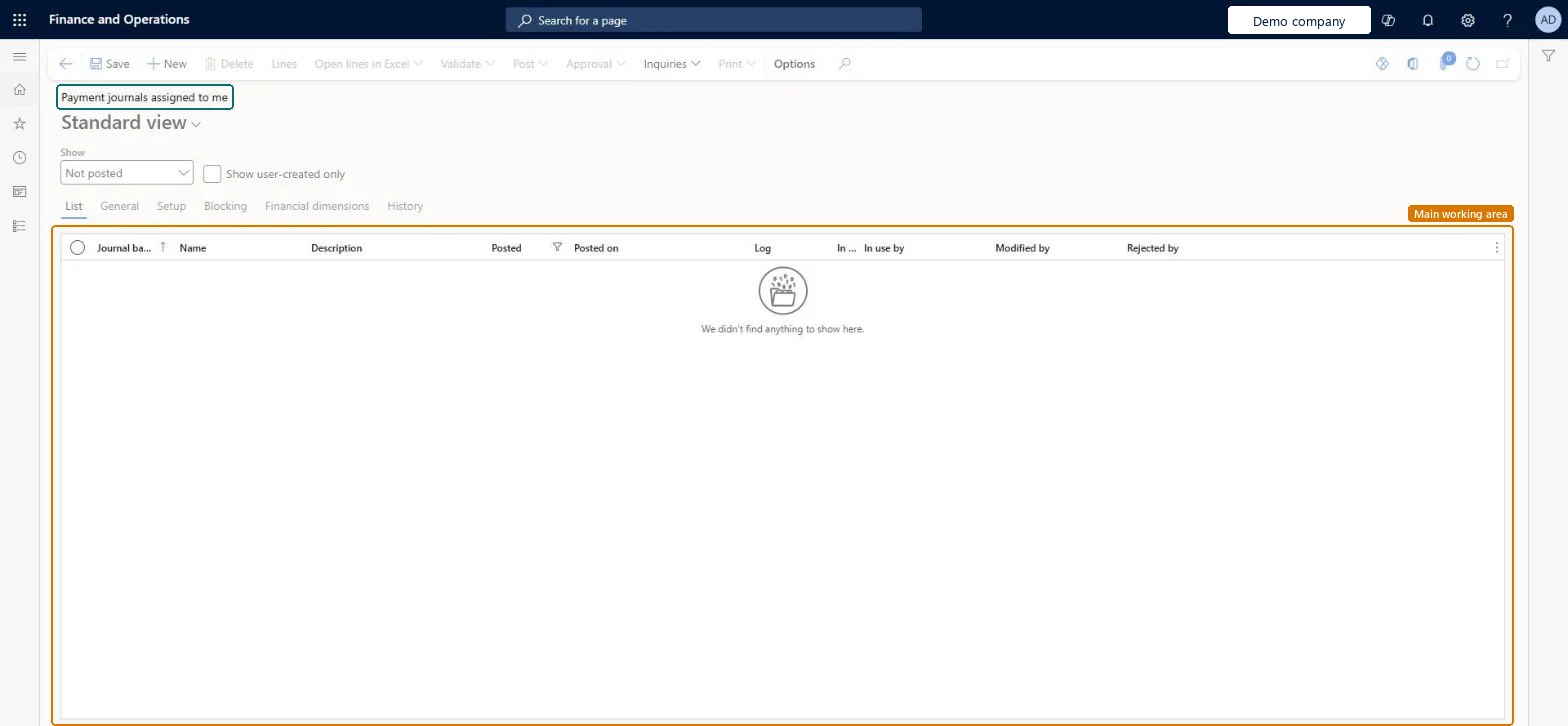
A journal page that shows the payment journals that are assigned to you, with the journal batch number, name, description, posting status and who last changed each journal.

Used by
Accounts payable clerk, Accounts payable manager, Chief financial officer and 6 more roles
Business process
Manage supplier payments in Dynamics 365 Finance
Menu item
VendPaymentAssignedToMeListPage
Main table
LedgerJournalTable
Data entity
CustomerPaymentJournalHeaderEntity
Show what matters for
PAGE GUIDEWhat the page does and how to use it7 sections. Choose a role to highlight what matters to you.
Everyone

1What it is and why

What it isA journal page that shows the payment journals that are assigned to you, with the journal batch number, name, description, posting status and who last changed each journal.
What you do hereUse this page to find the payment journals that are waiting on you and to open their lines.
Payment journals assigned to me page in Dynamics 365
The page in Dynamics 365. page title tab to open what to set or check
Functional consultant · Solution architect

2Where it fits

Business processManage accounts payable › Issue and settle supplier payments › Manage supplier payments in Dynamics 365 Finance
Menu pathAccounts payable › Payments › Payment journals assigned to me
End user · Functional consultant

3How to do it

About the examples: Examples and screenshots in this guide use BEAT, a demo company in a Dynamics 365 test environment. Use your own company's codes and values instead of copying them.

How to use it

  1. Go to Accounts payable > Payments > Payment journals assigned to me.
  2. Use the Show list to choose which journals to list, and tick Show user-created only to limit the list to your own.
  3. Read the Journal batch number, Name, Description, Posted and Modified by columns.
  4. Select a journal, then select Lines to open its lines.
  5. Select New to add a journal, then Save.

Source: Checked in Dynamics 365

Solution architect

4Design impact

Shared or per companyPer company: each legal entity has its own records. Microsoft data model
Technical architect

5Technical

Menu itemVendPaymentAssignedToMeListPage Checked in Dynamics 365
FormLedgerJournalTable Checked in Dynamics 365
TableLedgerJournalTableShown as “Ledger journal table” in Record infoKey field: JournalNumChecked in Dynamics 365
Data entitiesCustomerPaymentJournalHeaderEntityCustomer payment journal header Microsoft data model VendorPaymentJournalHeaderEntityVendor payment journal header Microsoft data model AssetJournalEntityFixed asset journal Microsoft data model AssetJournalV2EntityFixed asset journal V2 entity Microsoft data model BankJournalHeaderEntityBank journal header Microsoft data model CustInvoiceJournalHeaderEntityCustomer invoice journal header Microsoft data model ExpenseJournalHeaderEntityProject expense journal header Microsoft data model LedgerJournalEntityGeneral journal Microsoft data model LedgerReportingCurrencyAdjustmentJournalHeaderEntityReporting currency adjustment journal header Microsoft data model RAssetJournalHeaderEntityFixed asset journal header (Russia) Microsoft data model SlipJournalEntitySlip journal Microsoft data model VendInvoiceJournalHeaderEntityVendor invoice journal header Microsoft data model VendInvoiceRegisterHeaderEntityVendor invoice register header Microsoft data model AssetJournalHeaderEntityFixed asset journal table Microsoft data model LedgerJournalHeaderEntityLedger journal table Microsoft data model
Who can open itPrivilegesMaintain vendor payment journal transactions LedgerJournalTable5MaintainView vendor payment journal transactions LedgerJournalTable5ViewDutiesMaintain vendor payments PaymVendorPaymentsMaintainInquire into vendor payment status PaymVendorPaymentStatusInquire
9 security rolesChief financial officer CompanyChiefFinancialOfficerAccountant LedgerAccountantAccounting manager LedgerAccountingManagerAccounting supervisor LedgerAccountingSupervisorFinancial controller LedgerFinancialControllerAccounts payable centralized payments clerk PaymAccountsPayableCentralPaymClerkAccounts payable payments clerk PaymAccountsPayablePaymentsClerkAccounts payable clerk VendInvoiceAccountsPayableClerkAccounts payable manager VendInvoiceAccountsPayableManager
Checked in Dynamics 365
Roles to set it up and use itTo set it up or change itAccounts payable payments clerk PaymAccountsPayablePaymentsClerkTo use itAccounts payable manager VendInvoiceAccountsPayableManagerAccounting supervisor LedgerAccountingSupervisorAccounting manager LedgerAccountingManagerAccounts payable clerk VendInvoiceAccountsPayableClerkChief financial officer CompanyChiefFinancialOfficerGive people one of these roles. On this system, 9 roles can open this page.Checked in Dynamics 365
Actions on the pageOptions: Personalize, Page options, Edit, ShareChecked in Dynamics 365
Developer

6Developer

Open it by URLhttps://<your-environment>/?mi=VendPaymentAssignedToMeListPage
Integrate withCustomerPaymentJournalHeaderEntity data entity Microsoft data model
Table definitionLedgerJournalTable columns and relations Microsoft data model
Everyone

7Sources