BeyondERP.Newsletter
Menu

Transaction page · Accounts payable

Vendor invoices that failed to import

An exception list page that shows vendor invoice header records from the staging table of the Vendor invoice header data entity that could not be imported, with the error message for each.

Used by
Accounts payable clerk, Accounts payable manager, Chief financial officer and 12 more roles
Business process
Process supplier invoices
Menu item
VendEditInvoiceHeaderStagingListPage
Main table
VendorInvoiceHeaderStaging
Show what matters for
PAGE GUIDEWhat the page does and how to use it7 sections. Choose a role to highlight what matters to you.
Everyone

1What it is and why

What it isAn exception list page that shows vendor invoice header records from the staging table of the Vendor invoice header data entity that could not be imported, with the error message for each.
What you do hereIt is used by Accounts payable to handle failed imported invoices: open a record in edit mode, fix the issues, and create a pending invoice from it.
ExampleAfter you fix the problems on a failed invoice, select Create pending invoice to create the pending invoice in the background.
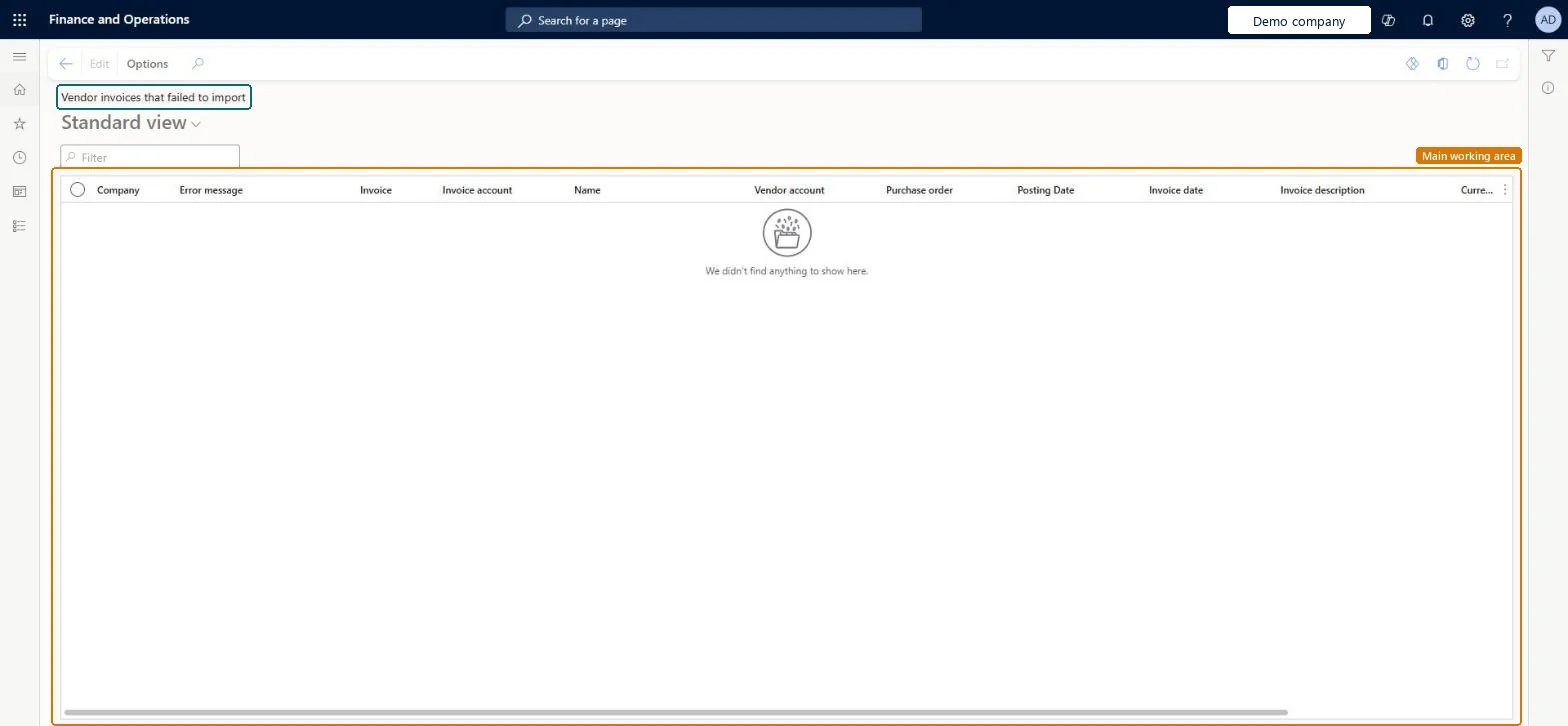
Vendor invoices that failed to import page in Dynamics 365
The page in Dynamics 365. page title tab to open what to set or check
Functional consultant · Solution architect

2Where it fits

Business processManage accounts payable › Process supplier invoices
Menu pathAccounts payable › Invoices › Import failures › Vendor invoices that failed to import
Used next byPending vendor invoices Microsoft Learn
End user · Functional consultant

3How to do it

About the examples: Examples and screenshots in this guide use BEAT, a demo company in a Dynamics 365 test environment. Use your own company's codes and values instead of copying them.

How to use it

  1. Go to Accounts payable > Invoices > Import failures > Vendor invoices that failed to import.
  2. Type in the Filter box to narrow the list.
  3. Read the Error message column to see why each invoice did not import.
  4. Select a record and select Edit to open it for changes.
  5. Check the Invoice, Invoice account, Vendor account, Purchase order and Invoice date columns for the record.

Source: Checked in Dynamics 365

Fields on the page

FieldWhat it meansTable column
CompanyThe company the invoice belongs to.Microsoft Learn Company
Error messageExplains why the invoice could not be created.Microsoft Learn ErrorMessage
NumberThe invoice number.Microsoft Learn
Purchase orderThe purchase order number on the invoice.Microsoft Learn
Line referenceThe identifier from the external system; it is not the invoice ID.Microsoft Learn
EditOpens the record so the problems can be fixed.Microsoft Learn
Solution architect

4Design impact

If you change it laterIf the import job is secured by role, user or legal entity, people see only the failed invoices those settings allow. Microsoft Learn
Technical architect

5Technical

Menu itemVendEditInvoiceHeaderStagingListPage Checked in Dynamics 365
FormVendEditInvoiceHeaderStagingListPage Checked in Dynamics 365
TableVendorInvoiceHeaderStagingShown as “Vendor invoice header” in Record infoChecked in Dynamics 365
Who can open itPrivilegesImport Vendor Invoices using Entity VendorInvoiceHeaderEntityMaintainExport Vendor Invoice using Entity VendorInvoiceHeaderEntityViewDuties InvoiceCaptureMaintainMaintain vendor invoices VendInvoiceVendorInvoicesMaintainInquire into vendor invoice status VendInvoiceVendorInvoiceStatusInquire
15 security rolesChief financial officer CompanyChiefFinancialOfficerInvoice capture operator InvoiceCaptureOperatorLanded cost agent ITMAgentAccountant LedgerAccountantAccounting manager LedgerAccountingManagerAccounting supervisor LedgerAccountingSupervisorFinancial controller LedgerFinancialControllerAccounts payable centralized payments clerk PaymAccountsPayableCentralPaymClerkAccounts payable payments clerk PaymAccountsPayablePaymentsClerkRental coordinator agent RentalCoordinatorAgentRental manager RentalManagerRental purchasing manager RentalPurchasingManagerRental sales manager RentalSalesManagerAccounts payable clerk VendInvoiceAccountsPayableClerkAccounts payable manager VendInvoiceAccountsPayableManager
Checked in Dynamics 365
Roles to set it up and use itTo set it up or change itAccounts payable manager VendInvoiceAccountsPayableManagerRental manager RentalManagerRental coordinator agent RentalCoordinatorAgentRental sales manager RentalSalesManagerAccounts payable clerk VendInvoiceAccountsPayableClerkTo use itAccounting supervisor LedgerAccountingSupervisorAccounting manager LedgerAccountingManagerChief financial officer CompanyChiefFinancialOfficerFinancial controller LedgerFinancialControllerAccountant LedgerAccountantGive people one of these roles. On this system, 15 roles can open this page.Checked in Dynamics 365
Actions on the pageButtons: EditChecked in Dynamics 365
Developer

6Developer

Open it by URLhttps://<your-environment>/?mi=VendEditInvoiceHeaderStagingListPage
Everyone

7Sources