BeyondERP.Newsletter
Menu

Inquiry page · Accounts payable

Promissory note statistics

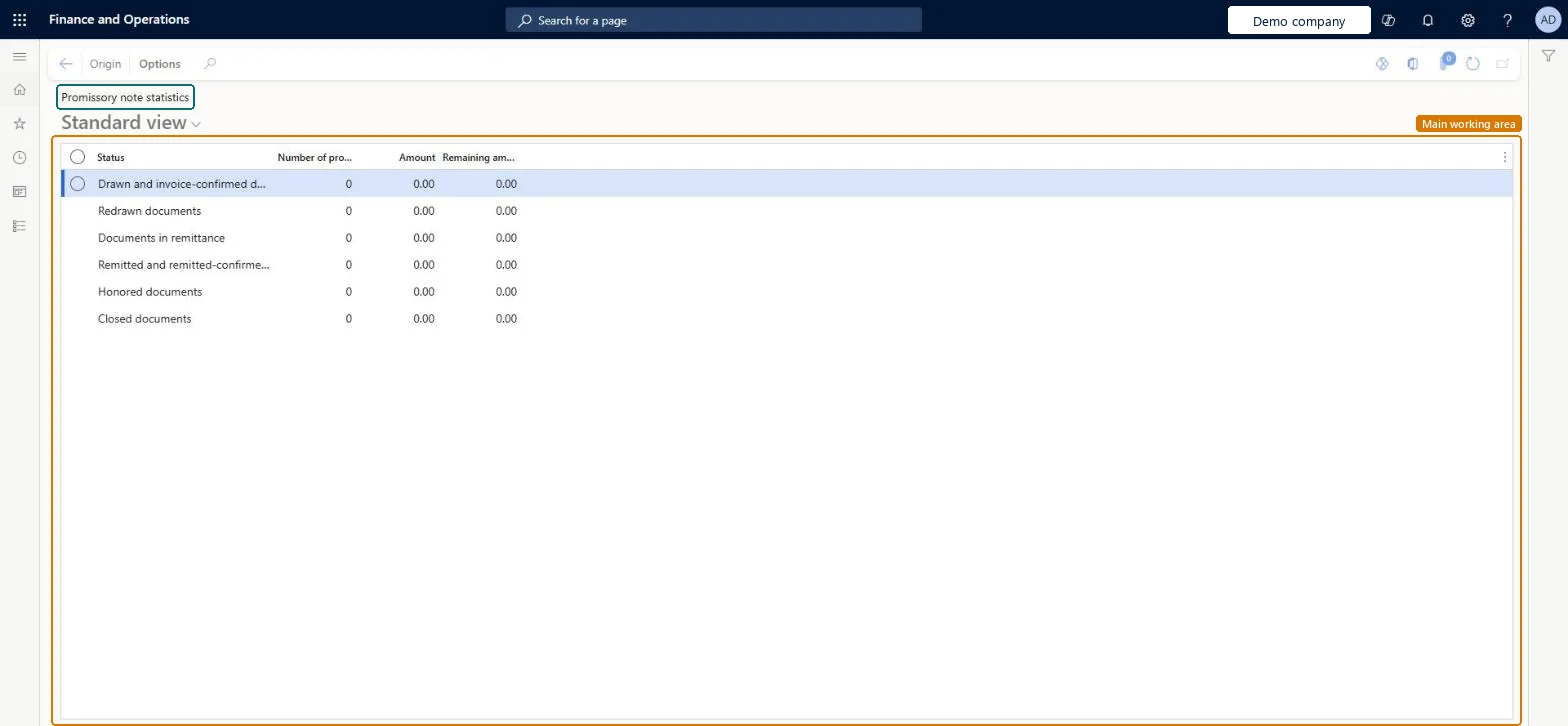
An inquiry page that shows statistics about the status of promissory notes, based on the data in the Promissory note journal.

Used by
Accounts payable clerk, Accounts payable manager, Chief financial officer and 6 more roles
Business process
Manage promissory notes
Menu item
VendPromissoryNoteStat
Main table
TmpPromissoryNoteStatistics
Show what matters for
PAGE GUIDEWhat the page does and how to use it7 sections. Choose a role to highlight what matters to you.
Everyone

1What it is and why

What it isAn inquiry page that shows statistics about the status of promissory notes, based on the data in the Promissory note journal.
What you do hereUse this page to see, for each promissory note status, the number of promissory notes, the amount and the remaining amount.
ExampleFor example, when a drawn promissory note of 100.00 is partly settled with 50.00, the Drawn line is updated but the Honored documents line is not, because it is updated only when the amount is settled in full.
Promissory note statistics page in Dynamics 365
The page in Dynamics 365. page title tab to open what to set or check
Functional consultant · Solution architect

2Where it fits

Business processManage accounts payable › Manage promissory notes
Menu pathAccounts payable › Inquiries and reports › Payment › Promissory note statistics
Set up firstPromissory note journal Microsoft Learn
End user · Functional consultant

3How to do it

About the examples: Examples and screenshots in this guide use BEAT, a demo company in a Dynamics 365 test environment. Use your own company's codes and values instead of copying them.

How to use it

  1. Go to Accounts payable > Inquiries and reports > Payment > Promissory note statistics.
  2. Read the Number of promissory notes, Amount and Remaining amount for each Status, such as Redrawn documents, Honored documents or Closed documents.
  3. Select a status row.
  4. Select Origin in the Action Pane to open it.

Source: Checked in Dynamics 365

Fields on the page

FieldWhat it meansTable column
StatusThe promissory note status the line summarizes.Microsoft Learn
Number of promissory notesHow many notes have this status.Microsoft Learn Number
AmountThe total amount for the status, in the accounting currency.Microsoft Learn AmountMST
Remaining amountThe amount still remaining for the status, in the accounting currency.Microsoft Learn RemaningAmount
Solution architect

4Design impact

If you change it laterA note counts as honored only when it is settled in full; partial settlements don't update the honored line. Microsoft Learn
Technical architect

5Technical

Menu itemVendPromissoryNoteStat Checked in Dynamics 365
FormVendPromissoryNoteStatistics Checked in Dynamics 365
TableTmpPromissoryNoteStatisticsShown as “Promissory note statistics” in Record infoChecked in Dynamics 365
Who can open itPrivilegesView promissory note statistics VendPromissoryNoteStatViewDutiesInquire into promissory note status PaymPromissoryNoteStatusInquire
9 security rolesChief financial officer CompanyChiefFinancialOfficerAccountant LedgerAccountantAccounting manager LedgerAccountingManagerAccounting supervisor LedgerAccountingSupervisorFinancial controller LedgerFinancialControllerAccounts payable centralized payments clerk PaymAccountsPayableCentralPaymClerkAccounts payable payments clerk PaymAccountsPayablePaymentsClerkAccounts payable clerk VendInvoiceAccountsPayableClerkAccounts payable manager VendInvoiceAccountsPayableManager
Checked in Dynamics 365
Roles to set it up and use itTo use itAccounts payable manager VendInvoiceAccountsPayableManagerAccounting supervisor LedgerAccountingSupervisorAccounting manager LedgerAccountingManagerAccounts payable clerk VendInvoiceAccountsPayableClerkChief financial officer CompanyChiefFinancialOfficerGive people one of these roles. On this system, 9 roles can open this page.Checked in Dynamics 365
Actions on the pageOptions: Personalize, Page options, ShareChecked in Dynamics 365
Developer

6Developer

Open it by URLhttps://<your-environment>/?mi=VendPromissoryNoteStat
Everyone

7Sources