Accounts payable clerk, Accounts payable manager, Landed cost agent and 4 more roles
Business process
Perform invoice matching in Dynamics 365 Finance
Menu item
PurchPostingHistoryInvoiceApproval
Main table
VendInvoiceInfoTable
Data entity
VendorInvoiceHeaderEntity
Show what matters for
PAGE GUIDEWhat the page does and how to use it7 sections. Choose a role to highlight what matters to you.
Everyone
1What it is and why
What it is
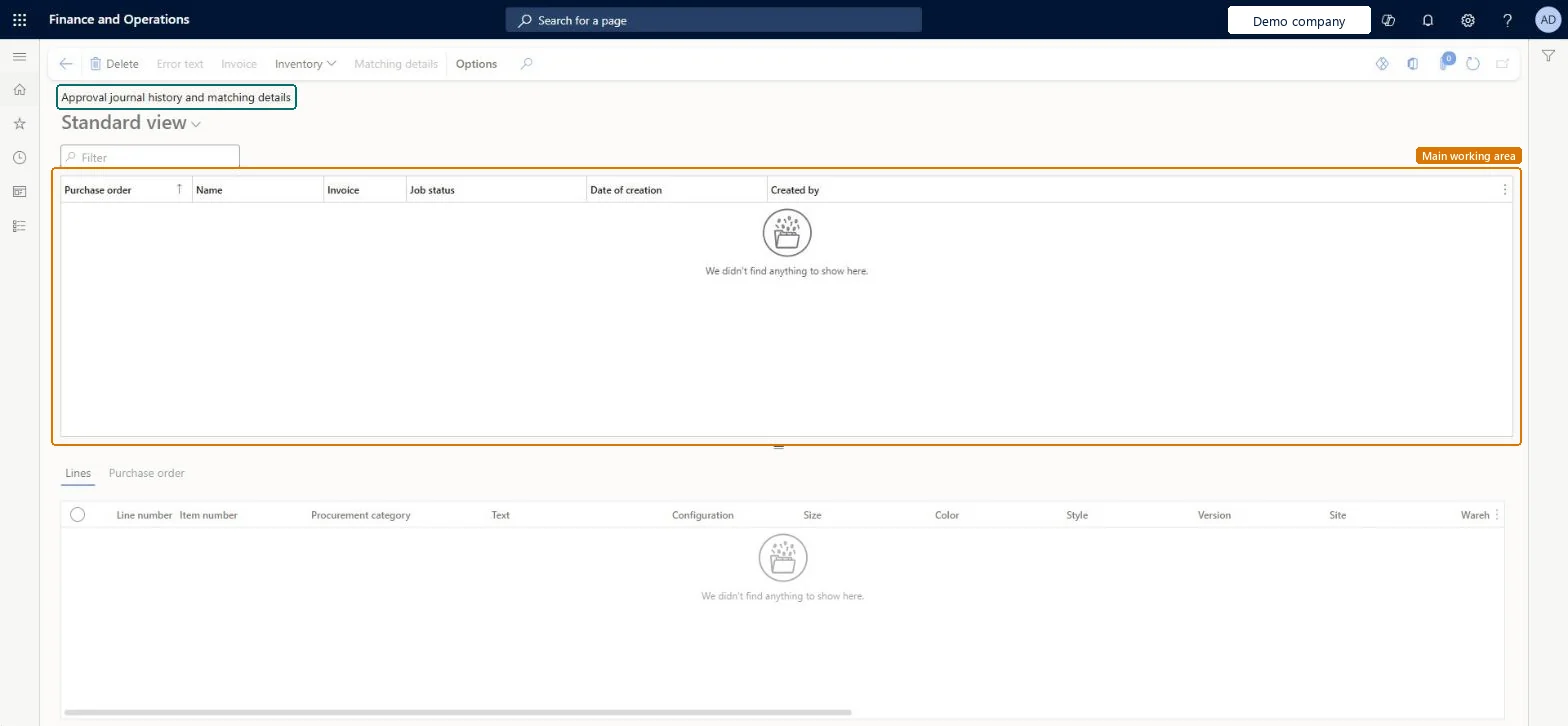
An inquiry page that shows the result of each vendor invoice posting, including the job status of every posting.
What you do here
Use this page to review posting results for vendor invoices and to open the matching details, where price and quantity matching discrepancies for an invoice are shown.
Example
For example, after a batch job updates vendor invoices, you can open this page to check the update history and see which postings were executed, are waiting, or had errors.
The page in Dynamics 365. page title tab to open what to set or check
About the examples: Examples and screenshots in this guide use BEAT, a demo company in a Dynamics 365 test environment. Use your own company's codes and values instead of copying them.
How to use it
Go to Accounts payable > Inquiries and reports > Invoice > Approval journal history and matching details.
Type in the Filter box to narrow the list by purchase order, name or invoice.
Select a row in the top grid to see its Purchase order, Name, Invoice, Job status, Date of creation and Created by details.
Open the Lines tab or the Purchase order tab below the grid to see the detail for the selected row.
Select Matching details to open the matching details for the selected invoice.
Use Error text, Invoice or Inventory in the Action Pane to open that information for the selected row.
Source: Checked in Dynamics 365
Fields on the page
Field
What it means
Table column
Job status
The result of each posting: Executed, Waiting or Errors detected.Microsoft Learn
ParmJobStatus
Error text
Shows the error message when a posting has errors.Microsoft Learn
Matching details
Opens the price and quantity matching discrepancies for the invoice.Microsoft Learn
To set it up or change itAccounts payable manager VendInvoiceAccountsPayableManagerRental manager RentalManagerRental coordinator agent RentalCoordinatorAgentRental sales manager RentalSalesManagerAccounts payable clerk VendInvoiceAccountsPayableClerkGive people one of these roles. On this system, 7 roles can open this page.Checked in Dynamics 365
Actions on the page
Buttons: Error text, Invoice, Inventory, Matching detailsChecked in Dynamics 365